
PAIN.001 Amount and Exchange Rate is the part of the message where most cross-border payment engines quietly break. I learned that the hard way while designing the CBPR+ payment rail for Volpay, translating PAIN.001 into PACS.008 across a live corridor. Testing surfaced calculation errors in specific scenarios. Not universally wrong. Dangerously plausible. That gap sent me deep into the logic governing amounts and exchange rates, and this article is everything I found.
Picture ABC Corp’s treasury team. They need to pay a US supplier USD 10,000, and the money is coming out of a EUR account. The bank’s payment engine has to answer three questions before it moves a single cent: how much EUR to debit, which exchange rate to apply, and which side of the transaction is fixed versus calculated.
Those answers live in two places inside the message: the Amount section, which tells the engine which leg is fixed, and the Exchange Rate Information section, which supplies the rate and the Unit Currency. Together they drive every FX calculation in PAIN.001. Get the relationship between them wrong and you get a technically valid message with a financially wrong number inside it.
If your team is migrating from MT101 to PAIN.001, or from MT103 to PACS.008, read this one twice. This is where the SWIFT MT and ISO 20022 approaches diverge the most, and it’s where I’ve seen the most implementation mistakes land.
Why Do PAIN.001 Amount and Exchange Rate Sections Matter?
Every cross-border payment instruction forces a choice: what exactly is the corporate fixing, and what is the bank allowed to calculate? Get that choice wrong in your engine logic and you either overpay a supplier, underfund a treasury sweep, or reject a payment that should have gone through clean.
I built the direction-detection logic in this article from scratch during SWIFT CBPR+ rail design work, orchestrating PAIN.001 through to PACS.008 with Volante. There was no handbook page that laid out the four scenarios below. I had to reverse-engineer them from failing test cases, and I’m giving you the finished version so your team doesn’t have to repeat that exercise.
Why this matters for migration teams: if you’re mapping MT101 to PAIN.001, or MT103 to PACS.008, this article is the field-level detail most migration playbooks skip. The tag names change. The direction-detection problem does not go away.
Part 1: The PAIN.001 Amount Section: InstructedAmount vs EquivalentAmount
1.1 Where It Sits in the Message
The Amount section lives inside the CreditTransferTransactionInformation block, one instance per credit transfer instruction, inside the broader PAIN.001 structure. It answers a single question: how much money, in what currency, is this instruction actually about?
1.2 The Fundamental Rule: Choose One, Only One
PAIN.001 forces exactly one of two mutually exclusive amount types per transaction. Full field-level detail on both is here, but the short version:
- InstructedAmount (XML tag: InstdAmt)
- EquivalentAmount (XML tag: EqvtAmt)
That’s a deliberate structural choice, not a formality. It determines which side of the transaction the corporate is fixing, and it drives every piece of Exchange Rate logic that follows.
1.3 Option A: Instructed Amount (InstdAmt)
Business meaning: “Make sure the creditor receives exactly this amount, in this currency. Debit whatever you need to from my account. That’s your problem, bank.”
The corporate fixes the creditor’s receipt. The bank calculates the account debit.
Technical structure:
<InstdAmt Ccy="USD">10000</InstdAmt>Fixed leg and variable leg:
- Fixed leg: instructed currency (USD). Creditor receipt is locked at USD 10,000.
- Variable leg: debit account currency (EUR). The bank calculates it.
When does a corporate use this? InstructedAmount reflects a contractual obligation to the creditor. A supplier invoice says “pay USD 10,000.” The corporate doesn’t care whether that costs EUR 9,100 or EUR 9,300 today. This is the amount type behind the majority of cross-border payments I’ve seen in production.
Two sub-cases matter here:
Sub-case A, same currency. If the instructed currency matches the debit account currency, there’s no FX conversion. The bank debits the same amount directly, and no ExchangeRateInformation block should be present.
<InstdAmt Ccy="EUR">50000</InstdAmt>Sub-case B, different currency. If the instructed currency differs from the debit account currency, FX conversion is required, and the ExchangeRateInformation block becomes essential.
1.4 Option B: Equivalent Amount (EqvtAmt)
Business meaning: “Debit exactly this fixed amount from my account. Convert it to the transfer currency and send the creditor whatever that produces.”
The corporate fixes their own cash outflow. The creditor receives a calculated amount, potentially not a round number, based on whatever rate gets applied.
Technical structure:
<EqvtAmt>
   <Amt Ccy="EUR">50000</Amt>
   <CcyOfTrf>USD</CcyOfTrf>
</EqvtAmt>| Sub-field | Tag | Purpose |
| Amount | Amt (with Ccy attribute) | Fixed debit amount and currency. Must match the debit account currency. |
| Currency of Transfer | CcyOfTrf | Target currency the creditor receives. This is the variable leg. |
Fixed leg and variable leg:
- Fixed leg: debit account currency (EUR 50,000). The corporate controls cash outflow.
- Variable leg: currency of transfer (USD). The bank calculates it.
Important rule I flag on every implementation review: the currency inside EqvtAmt/Amt must always match the debit account currency. If it doesn’t, reject the message. There’s no valid business case for a mismatch here.
When does a corporate use this? EquivalentAmount serves treasury and budget control. A treasury manager says: “We can release exactly EUR 50,000 this month for our US vendor. Whatever USD that converts to, that’s what they get.” I see this most in bulk payment runs where the corporate is holding a hard ceiling in home currency.
1.5 Side-by-Side Comparison
| Attribute | InstructedAmount (InstdAmt) | EquivalentAmount (EqvtAmt) |
| What is fixed? | Creditor’s receipt (transfer amount) | Corporate’s debit (account outflow) |
| What does the bank calculate? | Debit amount in account currency | Credit amount in transfer currency |
| Corporate driven by | Contractual obligation to creditor | Internal treasury or budget control |
| Who bears FX uncertainty? | Corporate. Debit amount varies. | Creditor. Receipt amount varies. |
| Typical use case | Supplier invoice in a specific currency | Monthly budget release in home currency |
| Most commonly used? | Yes. Majority of cross-border payments. | Less common. Treasury-driven scenarios. |
1.6 The Role of Charge Bearer
In both cases, the final amounts get one more adjustment from the Charge Bearer field, applied after the FX calculation runs. It can increase the debit (DEBT), reduce the creditor’s receipt (CRED), or split the cost between both parties (SHAR/SLEV). I cover the full mechanics of OUR, BEN, SHA and SLEV separately, but keep this sequencing in mind: FX calculation happens first, charge bearer logic happens second. Never the other way round.
Part 2: The PAIN.001 Exchange Rate Information Section Explained
2.1 Overview
The ExchangeRateInformation block sits inside CreditTransferTransactionInformation, at the same level as the Amount section. It’s optional in the schema. In practice, for any cross-currency payment, it’s operationally essential.
<XchgRateInf>
   <UnitCcy>EUR</UnitCcy>
   <XchgRate>1.08</XchgRate>
   <RateTp>AGRD</RateTp>
   <CtrctId>FX-2024-001247</CtrctId>
 </XchgRateInf>
2.2 Field 1: Unit Currency (UnitCcy)
What it is: the currency that represents “1 unit” in the exchange rate expression. It’s the base currency of the rate quotation.
How to read it: if UnitCcy is EUR and the exchange rate is 1.08, then 1 EUR = 1.08 USD.
Why it matters: exchange rates are directional. “1 EUR = 1.08 USD” and “1 USD = 0.926 EUR” describe the exact same market relationship, but the formula you apply depends entirely on which currency is stated as the unit. The engine cannot assume. It has to read UnitCcy explicitly, every single time.
Key design point worth remembering: the second currency is never stated anywhere in the ExchangeRateInformation block.
2.3 Field 2: Exchange Rate (XchgRate)
This is the numeric rate factor, the quantity of the second currency that one unit of the Unit Currency buys.
XchgRate and UnitCcy operate as an inseparable pair. Without knowing which currency is the unit, the numeric rate on its own means nothing. When a corporate submits PAIN.001, the rate they include may be purely estimative. Whether it’s binding or indicative comes down to the Rate Type field.
2.4 Field 3: Rate Type (RateTp)
| Rate Type Code | Meaning | Is Rate Binding? | Contract ID Required? |
| AGRD, Agreed | Rate pre-negotiated via forward FX contract or treasury deal | Yes. Bank must apply exactly this rate. | Operationally mandatory. |
| SPOT, Spot Rate | Bank applies the prevailing spot market rate at processing time | No. Bank determines the rate at execution. | Not required. |
| SALE, Sale Rate | Retail or published sale rate applied by the bank | No. Bank applies its published rate. | Not required. |
AGRD in practice: ABC Corp books a forward FX contract three months ahead at EUR/USD 1.08. On payment day, the PAIN.001 carries RateTp = AGRD, XchgRate = 1.08, and the ContractID. The bank has to validate that contract and apply exactly 1.08. No deviation.
SPOT in practice: a corporate builds a bulk payment file at 9 AM. The bank processes it at 2 PM and applies whatever the spot rate is at that moment. Any rate the corporate included in the file was informational only.
SALE in practice: a published retail sale rate. I see this more in consumer or branch banking than in corporate payment instructions.
2.5 Field 4: Contract Identification (CtrctId)
A unique reference, up to 35 characters, linking the payment instruction to a pre-existing FX contract in the bank’s treasury system. Required whenever RateTp = AGRD.
The bank validates that the contract exists and belongs to this corporate, covers the correct currency pair, hasn’t expired, and that the payment amount doesn’t exceed the contract’s remaining available balance.
MT101 equivalent: CtrctId maps to Tag 21F in an MT101, the FX contract reference linking a payment to a pre-booked deal. Same concept, different standard. Only the field name and location change.
2.6 MT101 vs PAIN.001: Amount and Rate Field Mapping
If your team is running an MT101 to PAIN.001 migration, this is the field mapping that actually matters for the amount and rate logic. I’ve built a full field-by-field MT101 to PAIN.001 mapping here, and it’s worth pairing with a look at how MT field formats work if your team is newer to the SWIFT side.
| Concept | MT101 Tag | PAIN.001 Element |
| Instructed amount | Field 32B | InstdAmt |
| Currency/amount for equivalent transfers | Field 33B | EqvtAmt/Amt |
| Exchange rate | Field 36 | XchgRate |
| FX contract reference | Field 21F | CtrctId |
The mapping looks clean on paper. It isn’t. MT101 doesn’t carry an explicit “Rate Type” concept the way PAIN.001 does with RateTp. Migration teams often bolt RateTp onto the message as AGRD by default whenever Field 36 is populated, without checking whether the source system actually meant a binding rate. Verify this assumption against your source system’s business rules before you go live.
Part 3: How Amount and Exchange Rate Work Together in PAIN.001
3.1 The Core Principle
Here’s the principle in one line: the Amount section tells the bank which leg is fixed. The Exchange Rate section provides the rate and one currency. The engine derives the second currency from the transaction context, detects the rate direction, and calculates the variable leg.
Neither section works in isolation. This is a deliberate ISO 20022 design choice, engineering the two sections to be complementary. Read one without the other and you get an incomplete picture. Process one without the other and you get wrong results.
I learned this the hard way during Volpay’s CBPR+ rail testing. Specific inverted-direction scenarios produced calculations that were plausible but wrong, and plausible-but-wrong is the most dangerous kind of bug in a payment engine, because it doesn’t trip an obvious alarm.
3.2 How the Second Currency Is Derived
The ExchangeRateInformation block never states the rate pair’s second currency explicitly. There’s no dedicated field for it. That’s intentional. A single credit transfer instruction always involves exactly two currencies. Once Unit Currency occupies one side of the rate pair, the engine already knows the other from the Amount fields.
| Amount Type | Currency A (always known) | Currency B (always known) | Unit Currency identifies | Second currency is |
| InstdAmt | Debit account currency (from DbtrAcct) | Instructed currency (from InstdAmt Ccy) | One of A or B | The other, derived automatically |
| EqvtAmt | Debit account currency (from EqvtAmt/Amt Ccy) | Currency of transfer (EqvtAmt/CcyOfTrf) | One of A or B | The other, derived automatically |
Validation bonus: if Unit Currency doesn’t match either of the two transaction currencies, reject the message. There’s no valid scenario where it shouldn’t.
3.3 The Rate Direction Problem: Multiply or Divide?
Once the engine knows both currencies and which one is Unit Currency, it hits the real challenge: which formula applies? The same numeric rate can be used two ways.
- Multiply: amount × rate. Converts FROM Unit Currency TO the second currency.
- Divide: amount ÷ rate. Converts FROM the second currency TO Unit Currency.
The detection rule I use in every engine I design:
- Unit Currency = fixed leg currency → natural direction → multiply
- Unit Currency = variable leg currency → inverted direction → divide
Part 4: Unit Currency in PAIN.001: Every Calculation Scenario Explained
4.1 Fixed Leg and Variable Leg: A Quick Recap
| Term | Meaning | Determined by |
| Fixed Leg | The amount and currency already known when the instruction is created. Doesn’t change regardless of the exchange rate. | The amount type the corporate chose |
| Variable Leg | The amount the bank has to calculate using the exchange rate. | The other side, whatever the corporate didn’t fix |
For InstdAmt: fixed leg is the instructed currency, variable leg is the debit account currency.
For EqvtAmt: fixed leg is the debit account currency, variable leg is the currency of transfer.
4.2 Scenario 1: Natural Direction: InstdAmt, Unit Currency = Instructed Currency
Setup: debit account EUR, instructed amount USD 10,000 (fixed leg), Unit Currency USD, exchange rate 0.92 (1 USD = 0.92 EUR).
“My supplier must receive USD 10,000. Whatever EUR gets debited from my account, you figure it out, bank.”
Rate direction: Unit Currency (USD) = instructed currency = fixed leg currency → natural direction → multiply.
Formula: debit amount (EUR) = InstdAmt (USD) × rate → 10,000 × 0.92 = EUR 9,200.
<Amt>
   <InstdAmt Ccy="USD">10000</InstdAmt>
 </Amt>
 <XchgRateInf>
   <UnitCcy>USD</UnitCcy>
   <XchgRate>0.92</XchgRate>
   <RateTp>AGRD</RateTp>
 </XchgRateInf>
Result: bank debits EUR 9,200 from ABC Corp’s account. Creditor receives USD 10,000.
4.3 Scenario 2: Natural Direction: EqvtAmt, Unit Currency = Debit Account Currency
Setup: debit account EUR, equivalent amount EUR 50,000 (fixed leg), currency of transfer USD (variable leg), Unit Currency EUR, exchange rate 1.08 (1 EUR = 1.08 USD).
“Debit exactly EUR 50,000 from my account. Send whatever USD that converts to.”
Rate direction: Unit Currency (EUR) = debit account currency = fixed leg currency → natural direction → multiply.
Formula: creditor receipt (USD) = debit amount (EUR) × rate → 50,000 × 1.08 = USD 54,000.
<Amt>
   <EqvtAmt>
     <Amt Ccy="EUR">50000</Amt>
     <CcyOfTrf>USD</CcyOfTrf>
   </EqvtAmt>
 </Amt>
 <XchgRateInf>
   <UnitCcy>EUR</UnitCcy>
   <XchgRate>1.08</XchgRate>
   <RateTp>AGRD</RateTp>
 </XchgRateInf>
Result: bank debits EUR 50,000. Creditor receives USD 54,000.
4.4 Scenario 3: Inverted Direction: InstdAmt, Unit Currency = Debit Account Currency
The real-world context here matters. Plenty of corporate treasury teams always express exchange rates from their debit account currency’s perspective, regardless of the amount type. It’s a natural habit: “How many USD does 1 EUR of mine buy?”
Pair that habit with an InstdAmt instruction and Unit Currency ends up misaligned with the fixed leg. The rate is expressed in the wrong direction relative to what’s fixed, and the bank has to detect that.
This is exactly the scenario that broke naive engine logic during testing. The logic multiplied where it should have divided. The output numbers were plausible enough that nobody noticed until we went looking for the specific case. That’s what made it dangerous. Verify your own engine’s default assumption here before you trust it in production.
Setup: debit account EUR (variable leg, bank calculates the EUR debit), instructed amount USD 10,000 (fixed leg), Unit Currency EUR (corporate always expresses rate from debit account perspective), exchange rate 1.08 (1 EUR = 1.08 USD).
The inversion detected: Unit Currency (EUR) = debit account currency = variable leg currency → inverted direction → divide.
If the bank blindly multiplied: USD 10,000 × 1.08 = USD 10,800. That’s nonsensical. The engine has to catch the inversion and divide instead.
Formula: debit amount (EUR) = InstdAmt (USD) ÷ rate → 10,000 ÷ 1.08 = EUR 9,259.26.
<Amt>
   <InstdAmt Ccy="USD">10000</InstdAmt>
 </Amt>
 <XchgRateInf>
   <UnitCcy>EUR</UnitCcy>
   <XchgRate>1.08</XchgRate>
   <RateTp>AGRD</RateTp>
 </XchgRateInf>
Result: bank detects the inversion, applies division, debits EUR 9,259.26. Creditor still receives USD 10,000. ISO 20022 doesn’t restrict which currency gets expressed as Unit Currency. Both directions are valid, and your engine has to handle both.
4.5 Scenario 4: Inverted Direction: EqvtAmt, Unit Currency = Transfer Currency
Setup: debit account EUR, equivalent amount EUR 50,000 (fixed leg), currency of transfer USD (variable leg), Unit Currency USD (corporate expressing the rate from the transfer currency’s perspective), exchange rate 0.92 (1 USD = 0.92 EUR).
Rate direction: Unit Currency (USD) = currency of transfer = variable leg currency → inverted direction → divide.
Formula: creditor receipt (USD) = debit amount (EUR) ÷ rate → 50,000 ÷ 0.92 = USD 54,347.83.
<Amt>
   <EqvtAmt>
     <Amt Ccy="EUR">50000</Amt>
     <CcyOfTrf>USD</CcyOfTrf>
   </EqvtAmt>
 </Amt>
 <XchgRateInf>
   <UnitCcy>USD</UnitCcy>
   <XchgRate>0.92</XchgRate>
   <RateTp>AGRD</RateTp>
 </XchgRateInf>
Result: bank debits EUR 50,000. Creditor receives USD 54,347.83. That’s slightly different from Scenario 2’s USD 54,000, purely because of the inverse rate expression and rounding. Mathematically the two are equivalent at the same underlying market rate without rounding.
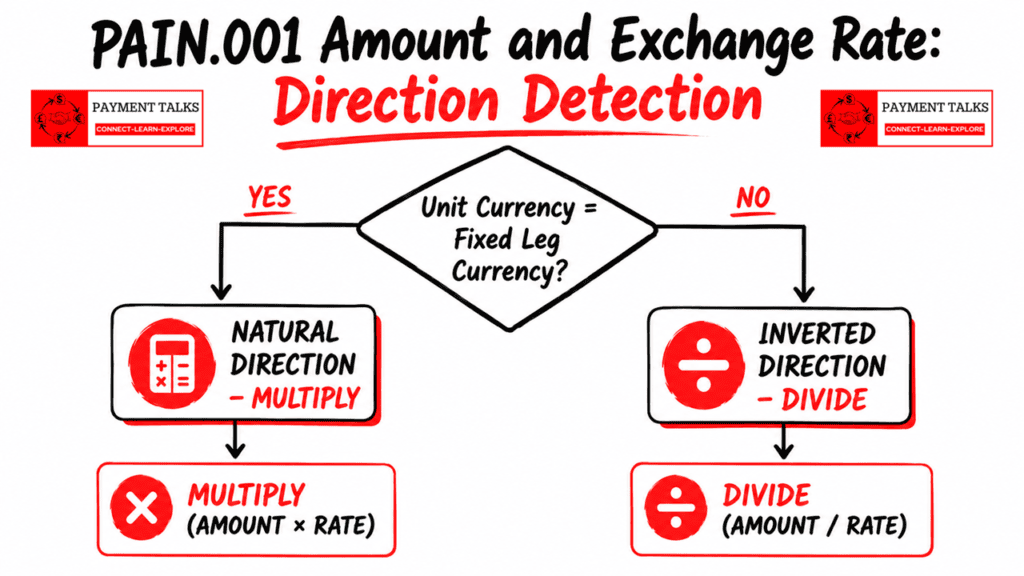
Visual : PAIN.001 Amount and Exchange Rate direction detection flowchart — multiply vs divide
4.6 The Complete Calculation Matrix
| Scenario | Amount Type | Unit Currency | Direction | Formula | Example Result |
| 1, Natural | InstdAmt USD 10,000 / Debit: EUR | Instructed Ccy (USD) | Natural, Multiply | Debit = InstdAmt × Rate | 10,000 × 0.92 = EUR 9,200 |
| 2, Natural | EqvtAmt EUR 50,000 / Transfer: USD | Debit Acct Ccy (EUR) | Natural, Multiply | Credit = DebitAmt × Rate | 50,000 × 1.08 = USD 54,000 |
| 3, Inverted | InstdAmt USD 10,000 / Debit: EUR | Debit Acct Ccy (EUR) | Inverted, Divide | Debit = InstdAmt ÷ Rate | 10,000 ÷ 1.08 = EUR 9,259.26 |
| 4, Inverted | EqvtAmt EUR 50,000 / Transfer: USD | Transfer Ccy (USD) | Inverted, Divide | Credit = DebitAmt ÷ Rate | 50,000 ÷ 0.92 = USD 54,347.83 |
The golden rule, worth pinning above your desk: Unit Currency = Fixed Leg Currency means Natural Direction means MULTIPLY. Unit Currency = Variable Leg Currency means Inverted Direction means DIVIDE.
4.7 Scenario 5: Corporate Provides No Exchange Rate
ISO 20022 allows the corporate to skip the ExchangeRateInformation block entirely. When that happens, the bank applies its own treasury or market rate. The calculation logic doesn’t change, only the rate source does.
| Rate Source | When Used |
| Rate in XchgRateInf (AGRD) | Corporate and bank pre-agreed a specific rate. Bank must apply exactly this. |
| Bank’s own treasury rate (SPOT) | No rate in the PAIN.001. Bank applies its prevailing rate at processing time. |
| Correspondent bank rate | Exotic currency pairs routed via an intermediary. Correspondent’s agreed rate applies. |
4.8 Scenario 6: Agreed Forward FX Contract
Setup: debit account GBP, instructed amount USD 200,000, Unit Currency USD, exchange rate 0.79 (1 USD = 0.79 GBP, pre-agreed forward contract rate), Rate Type AGRD, Contract ID FWD-LON-20240315-0091.
Business context: ABC Corp’s treasury booked a forward FX contract three months ago at USD/GBP 0.79. Today’s spot rate is 0.81, but they’re protected because they locked in 0.79 to hedge their FX exposure.
Formula: debit amount (GBP) = InstdAmt (USD) × rate. This is natural direction because Unit Currency (USD) equals the fixed leg.
200,000 × 0.79 = GBP 158,000.
At today’s spot rate: 200,000 × 0.81 = GBP 162,000. The forward hedge saved ABC Corp GBP 4,000.
Bank contract validation. Before applying that rate, the bank has to check the contract FWD-LON-20240315-0091 against its treasury system:
- Contract exists and belongs to ABC Corp.
- Currency pair is USD/GBP, matching the instruction.
- Contract hasn’t expired.
- USD 200,000 doesn’t exceed the remaining available balance.
Only after all four checks pass does the bank apply the agreed rate of 0.79.
4.9 Special Case: Bank’s Functional Currency as Intermediate
The three-currency problem: ISO 20022 supports exactly two currencies per transaction. Real-world banking sometimes involves a third, the bank’s own functional or base currency.
Consider this. ABC Corp (EUR debit) pays a US supplier (USD). Their Debtor Agent bank is UK-based, so GBP is its functional currency. Three currencies are now in play, EUR, USD, GBP, but ISO 20022 only allows two inside the message.
The answer is that the bank handles this internally, in two steps:
- EUR to GBP, using the EUR/GBP rate from the bank’s treasury deal.
- GBP to USD, using the GBP/USD rate from the bank’s treasury deal.
The intermediate GBP step never appears in the PAIN.001. The corporate only ever sees a net EUR to USD conversion.
For solution architects, this is where I’ve seen the most rounding disputes come from: multi-leg internal FX conversions have to account for rounding at each step. Rounding errors accumulated over two sequential conversions can differ from a single direct conversion, even when the underlying market rates are identical.
Part 5: How Banks Validate PAIN.001 Amount and Exchange Rate Fields
5.1 Overview
No payment engine I’ve ever worked on processes a PAIN.001 blindly. Before any FX calculation begins, the engine runs a structured sequence of validations. Fail any step and the result is a rejection plus a PAIN.002, the Payment Status Report, sent back to the corporate.
5.2 Structural Validations: Run First
V-S01, Amount Type Mutual Exclusivity: either InstdAmt or EqvtAmt, never both, never neither. This is the first gate. Nothing downstream runs if this fails.
V-S02, Currency Code Validity: every currency code must be a valid, active ISO 4217 code. Unknown or deprecated codes trigger immediate rejection.
V-S03, Amount is Positive and Non-Zero: the numeric value of any amount element must be greater than zero.
V-S04, Decimal Precision Matches Currency Standard: must not exceed the currency’s standard minor unit. EUR takes 2 decimal places, JPY takes 0, KWD takes 3.
V-S05, Exchange Rate is Positive: if ExchangeRateInformation is present, XchgRate must be a positive, non-zero number.
V-S06, Rate Type is a Valid Code: RateTp must be AGRD, SPOT, or SALE. Anything else triggers a schema error.
5.3 Business Rule Validations: Amount Block
V-B01, Account Currency Match for EquivalentAmount: the currency of EqvtAmt/Amt must match the debit account currency. A mismatch gets rejected.
V-B02, CurrencyOfTransfer Must Differ from Account Currency in EqvtAmt: there’s no FX rationale when both currencies are the same. The bank applies a warning or rejection.
V-B03, Available Balance Check: the calculated debit amount, after FX conversion, must not exceed the available balance including any approved overdraft facility.
5.4 Business Rule Validations: Exchange Rate Block
V-B04, Unit Currency Must Belong to the Transaction: Unit Currency must match one of the two transaction currencies exactly. A third, unrelated currency means rejection. This validation is also what drives second-currency derivation, so it’s not optional plumbing, it’s load-bearing.
V-B05, FX Presence Check: if the instructed currency differs from the debit account currency, ExchangeRateInformation should be present. If it’s absent, the bank may apply its own rate but must notify the corporate via PAIN.002.
V-B06, ExchangeRateInformation Must Be Absent for Same-Currency Transactions: if InstdAmt currency equals the debit account currency, there’s no FX conversion needed, and ExchangeRateInformation must not be present.
V-B07, AGRD Rate Type Requires Rate Value: if RateTp = AGRD, the XchgRate value must be present. Missing rate alongside AGRD is a reject.
V-B08, AGRD Rate Type Requires ContractIdentification: if RateTp = AGRD, CtrctId is operationally mandatory. Without the contract reference, the bank can’t identify which FX contract to validate and apply.
V-B09, FX Contract Existence and Validity: the contract reference must resolve to a real, active contract in the bank’s treasury system.
V-B10, Rate Reasonableness Check: the engine compares the corporate-provided rate against the live market rate. If the deviation exceeds the configured tolerance threshold, typically ±2% to ±5% (verify your institution’s actual configured threshold, this varies bank to bank), the payment gets flagged or rejected.
5.5 Cross-Field Validations
V-CF01, Detect Rate Direction and Apply Correct Formula: the engine explicitly determines and logs, in the audit trail, which calculation branch it applied, multiply for natural or divide for inverted. Document this for every single transaction. If your audit log doesn’t show which branch fired, you can’t prove to a regulator or an auditor why a number came out the way it did.
V-CF02, Calculated Result Must Be Positive and Non-Zero: after applying the formula, the resulting variable leg amount must be a positive, non-zero value.
V-CF03, For EqvtAmt, Derived Credit Must Meet Minimum Transfer Threshold: the derived creditor receipt must meet the minimum transfer amount for the target currency and corridor.
5.6 Charge Bearer: Applied After FX Calculation
| ChrgBr Value | Meaning | Effect on Debit | Effect on Creditor Receipt |
| DEBT | Debtor pays all charges | Debit = FX Amount + all charges | Creditor receives full FX amount |
| CRED | Creditor pays all charges | Debit = FX amount only | Creditor receives FX amount minus charges |
| SHAR | Each party pays their own side | Debit = FX amount + sending bank charges | Creditor receives FX amount minus receiving bank charges |
| SLEV | Follow service level agreement | Per agreed service schedule | Per agreed service schedule |
5.7 The Full Validation and Processing Sequence
- Structural validation: one amount type, valid currency codes, positive amounts, valid rate type.
- FX necessity check: is the debit account currency the same as the instructed or transfer currency?
- Unit Currency membership check: does Unit Currency belong to the two transaction currencies?
- Rate type vs rate presence: AGRD must have a rate value.
- Contract validation: if AGRD, look up and validate the FX contract in the treasury system.
- Rate reasonableness check: compare against the live market rate within tolerance.
- Currency pair supportability: can the bank handle this pair directly, or does it need to route via base currency?
- Derive the second currency from the transaction context.
- Detect rate direction: natural (multiply) or inverted (divide).
- Apply the correct formula and calculate the variable leg amount.
- Apply charge bearer logic on top of the FX result.
- Produce the confirmed debit amount and creditor receipt, then proceed to execution.
For solution architects: failures at steps 1 through 7 produce a rejection before any calculation runs at all. Don’t let your engine waste cycles calculating a number it’s about to throw away.
My Take: What Designing This Logic From Scratch Taught Me
I’ve spent a big part of my career designing payment systems, and the Amount and Exchange Rate sections are consistently underestimated. People assume they’re “just two fields.” They’re not. They’re the two fields most likely to move real money to the wrong place if you get them wrong.
The ISO 20022 documentation on Unit Currency is surprisingly thin. The standard defines the field, gives you a basic description, and then leaves the implementation logic open to bilateral agreement. No prescribed algorithm. No mandatory direction-detection rule. Nothing.
During the SWIFT CBPR+ rail design for Volpay, using Volante for orchestration to convert PAIN.001 through to PACS.008, I built this logic from nothing. The four-scenario calculation matrix, the Natural versus Inverted direction concepts, the Fixed Leg and Variable Leg terminology, none of it came from a handbook. It came from testing, from watching specific number combinations produce wrong results, and from a team sitting down to figure out exactly why.
The validation sequence in Part 5 was built the same way, through test failures, client edge cases, and architecture reviews, not from reading a specification top to bottom.
Credit where it’s due: ISO designed this well. The elegance of deriving the second currency automatically, the deliberate separation of Fixed and Variable legs, the way Rate Type governs binding versus indicative rates, all of it holds up under scrutiny. It’s just genuinely different from the traditional MT approach, and that difference is exactly where I see most migration mistakes happen.
If your team is moving from MT101/MT103 to PAIN.001/PACS.008, you need people who understand this at the logic level, not just the field-name level.
My advice, unfiltered: never assume natural direction. Build for all four calculation combinations explicitly. Make direction detection a logged, auditable step in your code, not something implicit that lives in a developer’s head. You won’t hit every one of these scenarios daily. But knowing this puts you in a different league when you’re designing, implementing, or testing a cross-border payment system.
Frequently Asked Questions
Q: What is the difference between InstructedAmount and EquivalentAmount in PAIN.001?
A: InstructedAmount fixes the creditor’s receipt. The corporate specifies exactly how much the creditor must receive, and the bank calculates the debit. EquivalentAmount fixes the corporate’s own debit. The corporate controls their cash outflow in the home currency, and the creditor receives whatever that converts to. Use InstructedAmount for a contractual obligation to pay a specific amount. Use EquivalentAmount when treasury needs to control the exact cash release. For same-currency payments, InstructedAmount is always the correct choice, since EquivalentAmount for a same-currency transfer is redundant and many bank systems will reject it outright.
Q: What is Unit Currency in PAIN.001 and why does it matter?
A: Unit Currency (UnitCcy) identifies which currency represents “1 unit” in the exchange rate expression. If Unit Currency is EUR and the exchange rate is 1.08, that means 1 EUR = 1.08 USD. It matters because ISO 20022 doesn’t mandate which currency has to be the Unit Currency. A corporate can always express rates from their debit account perspective, even inside an InstructedAmount instruction. Any engine that assumes Unit Currency is always the instructed currency will fail on inverted-direction transactions. I hit this exact assumption in an early Volpay engine iteration, and it’s the kind of bug that doesn’t surface until you test very specific cross-currency combinations.
Q: How does a bank detect the exchange rate direction in a PAIN.001 cross-currency payment?
A: The bank identifies the fixed leg from the amount type, then compares it to the Unit Currency. If Unit Currency matches the fixed leg currency, the engine multiplies. That’s the natural direction. If Unit Currency matches the variable leg currency, the engine divides. That’s the inverted direction. Direction has to be detected explicitly before any formula runs. An engine that always multiplies will produce catastrophically wrong results on inverted-direction transactions, and the resulting numbers will be plausible enough not to trip an obvious alarm, which is exactly what makes this bug dangerous.
Q: What does Rate Type AGRD mean in ISO 20022 PAIN.001, and will the bank always use the rate I provide?
A: AGRD, Agreed, means the rate was pre-negotiated via a forward FX contract or treasury deal. The bank is contractually obligated to apply exactly this rate, and it has to validate the Contract Identification reference against its treasury system before processing. Whether the bank uses your rate depends entirely on the Rate Type, not on whether you included a number. RateTp = AGRD with a valid contract reference is binding. RateTp = SPOT means your rate is informational only, and the bank applies its own prevailing rate at processing time.
Q: Why is the second currency not stated in the ExchangeRateInformation block?
A: Because it would be redundant. A single credit transfer instruction always involves exactly two currencies, and the Amount section already carries both, the debit account currency and either the instructed currency or the currency of transfer. Adding a second currency field to the ExchangeRateInformation block would create a third source of truth and a third potential point of inconsistency. The schema is intentionally minimal. Once Unit Currency is confirmed to belong to the transaction, the engine derives the second currency automatically from the amount fields.
Q: Can the bank’s base currency appear in PAIN.001 as the Unit Currency?
A: Only if it’s also one of the two transaction currencies. If the bank’s functional currency happens to match the corporate’s debit account currency, it naturally appears in the message. But when a bank uses its own base currency purely as an internal intermediate step, for example converting EUR to GBP and then GBP to USD internally, that intermediate currency never appears in the PAIN.001. The corporate only ever sees a net EUR to USD conversion. The multi-leg conversion is handled entirely inside the engine.
Q: Which SWIFT MT fields map to PAIN.001 Amount and Exchange Rate elements?
A: Field 32B maps to InstdAmt, Field 33B maps to EqvtAmt/Amt, Field 36 maps to XchgRate, and Field 21F maps to CtrctId. The mapping is straightforward at the tag level, but MT101 has no explicit equivalent of PAIN.001’s RateTp field, so migration teams need a clear business rule for how they infer Rate Type from the source MT message rather than assuming AGRD by default.
Q: Does ISO 20022 require the ExchangeRateInformation block on every cross-currency PAIN.001?
A: No. The block is optional in the schema. If a corporate omits it on a genuine cross-currency instruction, the bank applies its own treasury or market rate and should notify the corporate of the applied rate via the PAIN.002 status report. What ISO 20022 does require, through business rule validation, is that the block must be absent when there’s no currency mismatch, and should be present when there is one.
Summary: Key Takeaways
- The Amount section offers two mutually exclusive choices. InstdAmt fixes the creditor’s receipt, EqvtAmt fixes the corporate’s debit. The choice reflects business intent, contractual obligation versus treasury budget control.
- The ExchangeRateInformation block contains four fields: Unit Currency, Exchange Rate, Rate Type, and Contract ID. Only one currency is explicitly stated. The second is always derived from the transaction context.
- Unit Currency identifies the “1 unit” side of the rate expression. It can legally be either the Fixed Leg Currency or the Variable Leg Currency. ISO 20022 does not restrict the direction. Your engine has to handle both.
- Rate direction is detected by comparing Unit Currency against the Fixed Leg. Fixed Leg = Unit Currency means Natural, Multiply. Variable Leg = Unit Currency means Inverted, Divide. A robust engine implements both branches explicitly and logs which one it applied.
- The second currency is never stated in the Exchange Rate block. It’s always derived from the transaction’s amount fields and debtor account. The schema is intentionally minimal, since an explicit statement would be redundant.
- Validations must run before any calculation. Structural checks first, then business rules on the Amount block, then the Exchange Rate block, then cross-field consistency, then FX calculation. Charge Bearer is applied last.
- This is architecture-level knowledge. You may not hit every scenario daily, but understanding PAIN.001 Amount and Exchange Rate at this depth is what separates a payments professional who truly understands ISO 20022 from someone who has only read the specification.
Complete Scenario Reference
| Scenario | Amount Type | Unit Currency | Direction | Formula | Example |
| 1, Same currency | InstdAmt EUR 50,000 / Debit: EUR | N/A, No FX | No FX | Debit = InstdAmt (1:1) | Debit EUR 50,000 / Credit EUR 50,000 |
| 2, Natural InstdAmt | InstdAmt USD 10,000 / Debit: EUR | USD (Instructed) | Natural, Multiply | Debit = InstdAmt × Rate | 10,000 × 0.92 = EUR 9,200 |
| 3, Natural EqvtAmt | EqvtAmt EUR 50,000 / Transfer: USD | EUR (Debit Acct) | Natural, Multiply | Credit = DebitAmt × Rate | 50,000 × 1.08 = USD 54,000 |
| 4, Inverted InstdAmt | InstdAmt USD 10,000 / Debit: EUR | EUR (Debit Acct) | Inverted, Divide | Debit = InstdAmt ÷ Rate | 10,000 ÷ 1.08 = EUR 9,259.26 |
| 5, Inverted EqvtAmt | EqvtAmt EUR 50,000 / Transfer: USD | USD (Transfer) | Inverted, Divide | Credit = DebitAmt ÷ Rate | 50,000 ÷ 0.92 = USD 54,347.83 |
| 6, Agreed forward | InstdAmt USD 200,000 / Debit: GBP | USD (Instructed) | Natural, Multiply | Debit = InstdAmt × Rate (contract validated) | 200,000 × 0.79 = GBP 158,000 |
What’s Next
The Amount and Exchange Rate sections are two of the most consequential fields inside the CreditTransferTransactionInformation block, and by this point you understand not just how a corporate initiates a payment instruction in PAIN.001, but how the bank actually processes the amount and exchange rate behind it.
The natural next question: what does the bank send back? In the next article in this series, I’ll walk through PAIN.002, the Customer Payment Status Report, the message your bank sends after receiving a PAIN.001. Full message structure, every status code, and how to build a reconciliation process around PAIN.002 responses that actually holds up in production.
▶ Watch the Full Walkthrough on YouTube
Prefer video? The full walkthrough is on the PaymentTalks YouTube channel.