
Introduction
After understanding who can initiate a PAIN.001 and why, the next natural question is:
How is a PAIN.001 message actually built?
Because in payment systems, structure is everything.
Banks don’t process “intent”.
They process hierarchy, grouping, and repetition.
This article focuses on the big picture structure of PAIN.001:
- The architectural layers
- How payments are grouped
- How single vs bulk is formed
- How this compares with legacy MT101
We will not go field-by-field here.
That deep dive comes in the next article.
Cardinality in ISO 20022
Cardinality is one of those ISO 20022 concepts that looks theoretical at first—but once you understand it, it becomes the key to reading, building, and validating messages correctly (especially PAIN.001)
What Is Cardinality? (Plain English)
In ISO 20022, cardinality defines how many times a data element is allowed to appear in a message.
In simple terms, cardinality answers:
“How many times can this field occur?”
It controls:
- Whether a field is mandatory or optional
- Whether it can appear once or multiple times
Cardinality Syntax (How ISO Writes It)
ISO 20022 expresses cardinality using this format:
[min..max]
Common patterns
| Cardinality | Meaning |
| [1..1] | Mandatory, must appear exactly once |
| [0..1] | Optional, may appear once or not at all |
| [1..n] | Mandatory, can repeat |
| [0..n] | Optional, can repeat |
Rule of thumb
- 0 = optional
- 1 = mandatory
- n = repeatable
Why Cardinality Exists (Why ISO Needs It)
ISO 20022 messages are:
- Machine-validated
- Processed at scale
- Used across many countries and banks
Without cardinality:
- Messages would be ambiguous
- Banks wouldn’t know what to expect
- Validation would be inconsistent
So cardinality ensures:
- Predictability
- Automation
- Straight-through processing (STP)
Cardinality vs “Mandatory / Optional” (Important Distinction)
Many people think cardinality only means mandatory vs optional.
That’s only half the story.
Cardinality controls TWO things:
- Is the element required?
- Can it repeat?
Example:
- [1..n] → mandatory and repeatable
- [0..n] → optional and repeatable
This is why cardinality is more powerful than a simple “mandatory” flag.
Cardinality vs Business Rules (Important Difference)
Cardinality is defined by ISO.
But banks may add stricter business rules, for example:
- ISO: [0..1] (optional)
- Bank rule: “Mandatory in our implementation”
So:
- ISO cardinality = structural rule
- Bank rules = implementation rule
Both must be satisfied.
Intuitive analogies to remember it
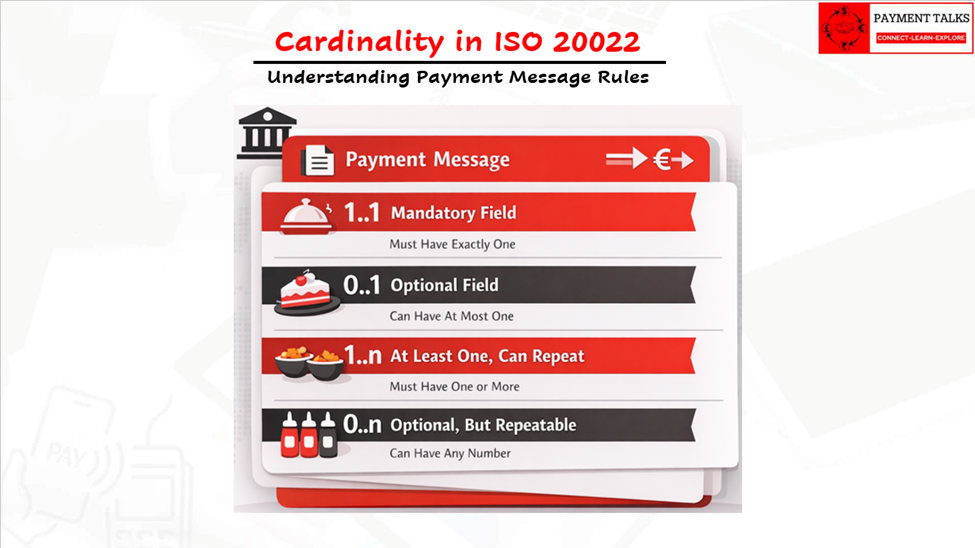
You can think of cardinality in ISO 20022 using a few simple analogies:
- Restaurant menu analogy
- “You must choose 1 main dish” → 1..1.
- “You may choose 0 or 1 dessert” → 0..1.
- “You must choose at least 1 side, can choose several” → 1..n.
- “You may choose as many toppings as you like, or none” → 0..n.
The Design Philosophy Behind PAIN.001
PAIN.001 belongs to ISO 20022.
ISO 20022 messages are built with one clear principle:
Model the business reality explicitly, not implicitly.
Instead of:
- Flat tags
- Guessing group boundaries
- Order-dependent interpretation
ISO uses:
- Clear layers
- Logical grouping
- Strong validation
- Repeatable blocks
So PAIN.001 is not just an XML file.
It’s actually a mini payment system model inside a message.
The Architectural Structure of PAIN.001
At the highest level, PAIN.001 follows a 3-layer hierarchy.
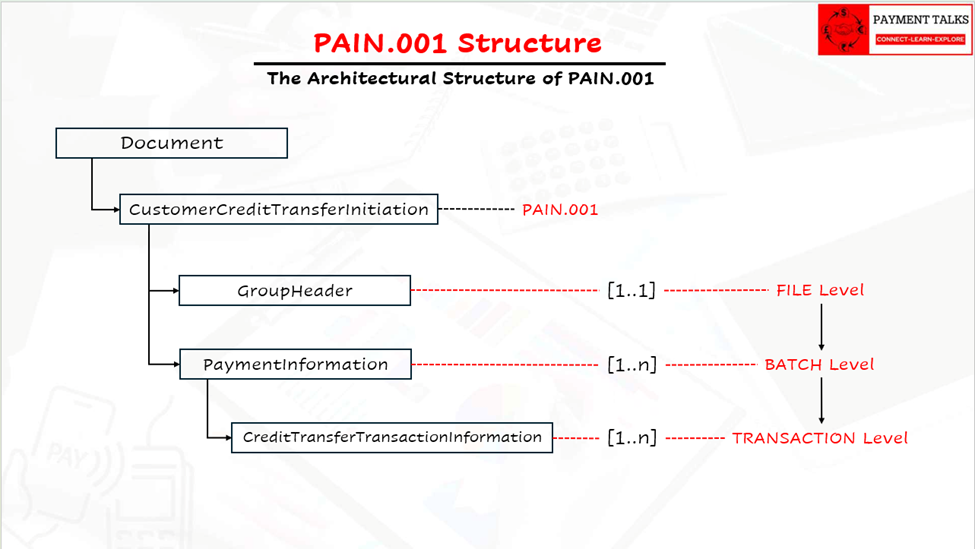
Let’s understand what each layer means.
Layer 1 — Group Header (File Level)
Think of this as the envelope of the entire file.
It answers:
- Who created this file?
- When was it created?
- How many payments are inside?
- What is the control sum?
Key idea:
Everything in the file shares this context.
If this layer fails validation → entire file fails.
Layer 2 — Payment Information (Batch Level)
This is the most important structural concept in PAIN.001.
Each Payment Information block represents:
One debit account + one execution context
Inside one batch:
- One debtor
- One debtor account
- One debtor bank
- One execution date
- Many credit transfers allowed
So practically:
One batch = one funding source
If you need:
- Multiple debit accounts
- Different execution dates
You create multiple batches.
Layer 3 — Credit Transfer Transaction (Transaction Level)
This is the actual payment instruction.
This layer is inside the Payment Information that is inside layer 2.
Each block represents:
- One beneficiary
- One amount
- One transfer
So:
One transaction = one payment
If you want 1,000 salary payments → you repeat this block 1,000 times.
How PAIN.001 Naturally Supports Single vs Bulk
Here’s the most beautiful part of PAIN.001:
There is NO special “bulk” message.
Bulk is simply created through repetition of structure.
Single Payment (PAIN.001)
Structure:
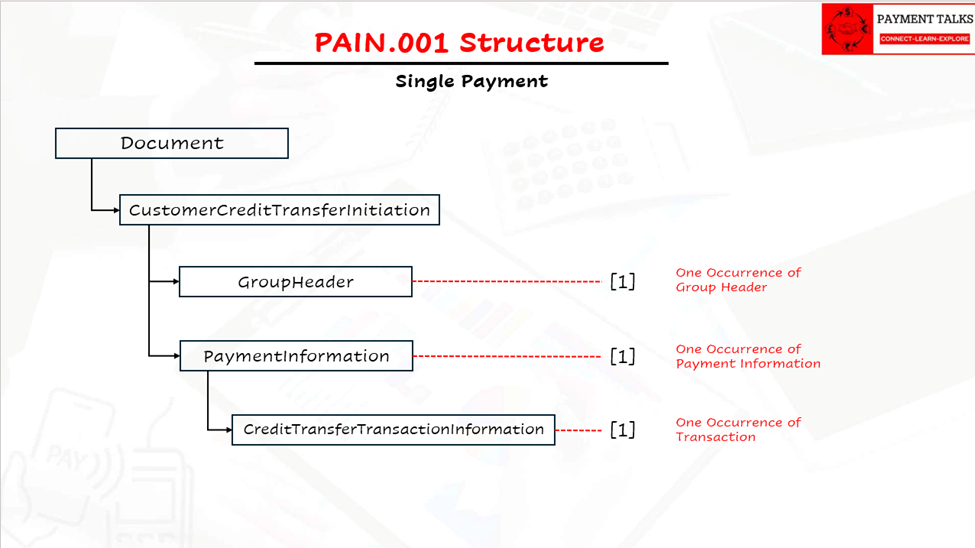
Meaning:
- One debit
- One credit
Use case:
- Urgent supplier payment
- One-off transfer
The number of transactions in CBPR+ payment usage guidelines is fixed to 1.
Bulk Payment (PAIN.001)
Structure:
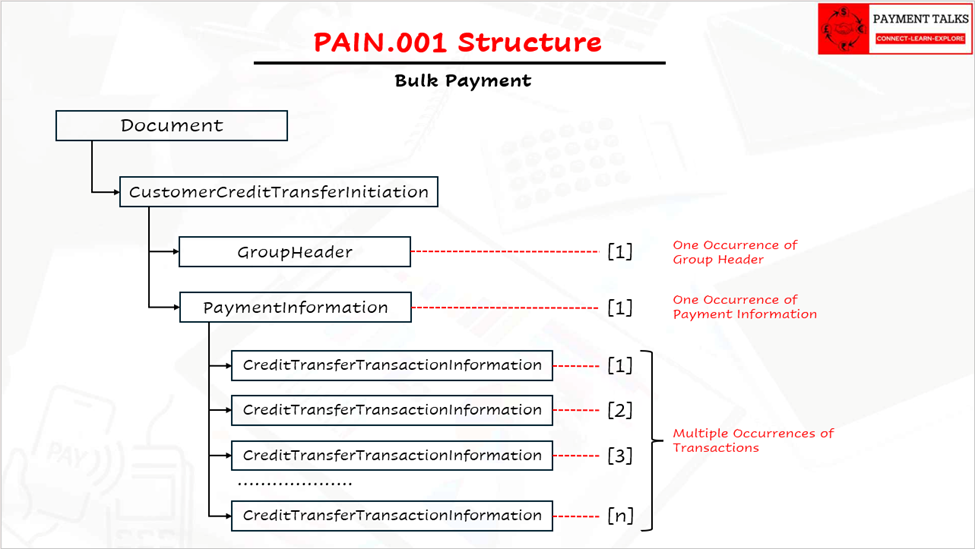
Meaning:
- One debit account
- Many credits
Use case:
- Salaries
- Vendor batches
- Marketplace payouts
Multi-Debit Bulk
Structure
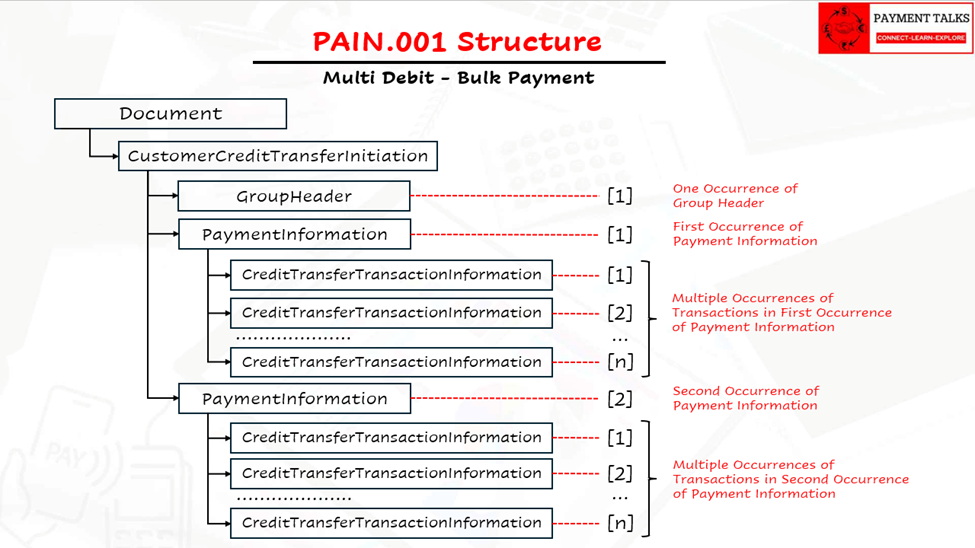
Meaning:
- Multiple debit accounts
- Multiple bulk groups
MAIN Point
Bulk in PAIN.001 is not a feature.
It’s simply cardinality + hierarchy working together.
This makes the design:
- Cleaner
- Scalable
- Easier to validate
Understanding the 5-Block Structure of SWIFT MT Messages (Including MT101)
Before you even reach the payment details inside an MT101, every SWIFT MT message first passes through a standard envelope.
Think of it like sending a courier package:
- Outside → routing & delivery info
- Inside → business documents
Similarly, SWIFT MT messages separate network delivery from business content.
All MT messages — whether MT101, MT103, MT202, MT940, etc. — follow the same universal structure defined by SWIFT.
Big Picture View
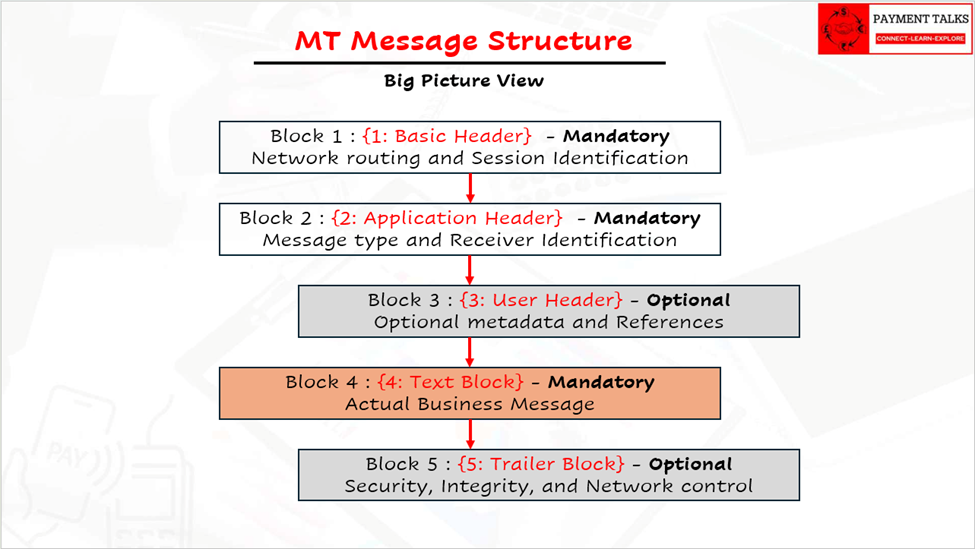
These are called the 5 blocks.
Only Block 4 contains business/payment data.
The rest exist for routing, control, and security.
Simply Put:
“Block 4 = Business Logic. Everything else = Delivery Infrastructure”
Block 1 — Basic Header Block
Purpose – Network routing and session identification
This block tells SWIFT:
- Who sent the message
- Which session it belongs to
- How to route it internally
It is purely technical — banks don’t use this for payment decisions.
Example: {1:F01CORPGB2LAXXX0000000000}
Key Characteristics
- Mandatory
- Always present
- No business meaning
- Not visible to corporate users
Simple Analogy
Block 1 = Return address on an envelope
Block 2 — Application Header Block
Purpose – Message type + receiver identification
This tells SWIFT:
- Which bank should receive the message
- What type of message it is (101, 103, etc.)
- Priority
Without this block – SWIFT wouldn’t know where to deliver the message.
Example: {2:I101BANKDEFFXXXXN}
Key Characteristics
- Mandatory
- Network-level only
- No payment data
Simple Analogy
Block 2 = Destination address on envelope
Block 3 — User Header Block (Optional)
Purpose – Optional metadata and references
Banks and corporates use this for:
- Tracking IDs
- Service-specific fields
- Regulatory/compliance flags
This block does not affect message structure, only adds metadata.
Example: {3:{108:PAYROLLSEP24}{121:UETR123456789}}
Key Characteristics
- Optional
- Bank/custom use
- Not core payment logic
Simple Analogy
Block 3 = Sticky notes on envelope (tracking labels, phone numbers, etc.)
Block 4 — Text Block (Most Important)
Purpose – Actual business message
This is where:
- Payment instructions
- Accounts
- Amounts
- Beneficiaries
- References
ALL reside.
For MT101 specifically: Sequences A & B are inside Block 4.
Example:
{4:
:20:REF001
:50H:/12345678
ABC LTD
:21:PAY1
:32B:EUR1000,
:59:SUPPLIER
-}
How It Works
Block 4 contains:
- Tags (:20:, :50:, :32B:, etc.)
- Sequences
- Payment instructions
Each MT message type defines, which tags are allowed.
Key Characteristics
- Mandatory
- Business logic lives here
- Parsed by bank systems
- Most important block
Simple Analogy
Block 4 = The actual document inside the envelope
Block 5 — Trailer Block
Purpose – Security, integrity, and network control
This block ensures:
- Message not tampered
- Integrity maintained
- Authentication possible
Example : {5:{CHK:ABC123456789}{MAC:987XYZ}}
Key Characteristics
- Optional but common
- Security-focused
- No business logic
Simple Analogy
Block 5 = Tamper-proof seal on envelope
Putting It All Together
Complete MT Message Example
{1:F01CORPGB2LAXXX0000000000}
{2:I101BANKDEFFXXXXN}
{3:{108:REF123}}
{4:
:20:REF001
:50H:/12345678
ABC LTD
:21:PAY1
:32B:EUR1000,
:59:SUPPLIER
-}
{5:{CHK:ABC123456789}}
Key Takeaway
In every MT message, only Block 4 matters for business processing.
Blocks 1, 2, 3, and 5 exist purely to deliver and protect the message.
MT101 Structure (Conceptually)
PAIN.001’s predecessor is SWIFT MT101.
But MT101 uses a very different design philosophy.
- Text-based
- Tag-sequence driven
- Flat
- Implicit grouping
Instead of hierarchy, it relies on:
- Repeated tags
- Sequence numbers
- Bank interpretation
There is no explicit:
- File object
- Batch object
- Transaction object
Everything is inferred.
MT101 Block 4 Business Structure
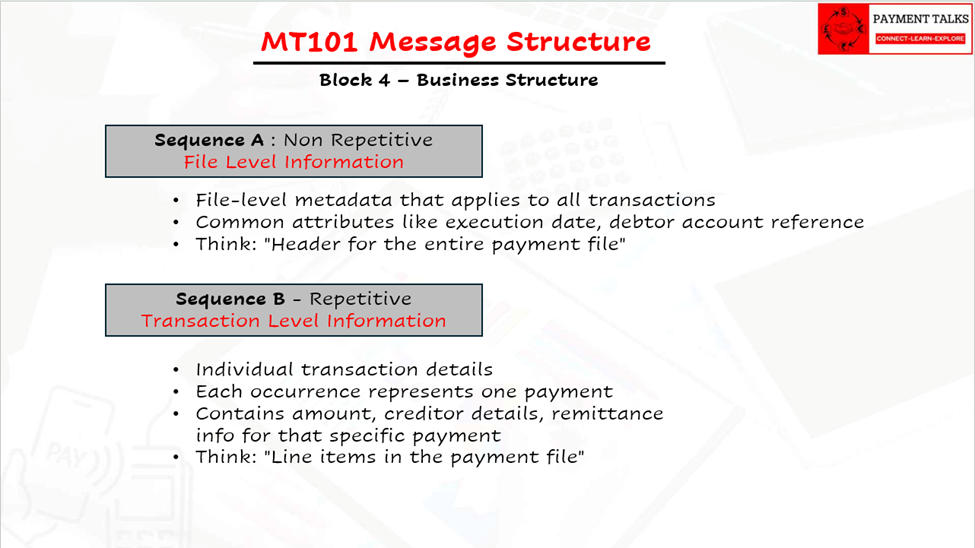
Two Conceptual Levels
Sequence A (Single occurrence)
- File-level metadata that applies to all transactions in the message
- Contains common attributes like execution date, debtor account reference
- Think: “Header for the entire payment file”
Sequence B (Multiple occurrences)
- Individual transaction details
- Each occurrence represents one payment
- Contains amount, creditor details, remittance info for that specific payment
- Think: “Line items in the payment file”
Key Characteristics
- Fixed hierarchy: Always Sequence A first, then repeating Sequence B
- No Explicit delimiters: Sequence B repetition is just appearance of Tag that belongs to next iteration.
- Shared attributes: All Sequence B transactions inherit Sequence A settings unless overridden
- Atomic message: One complete MT101 = one business instruction set
MT101 = One File Header (Seq A) + Multiple Transactions (Seq B)
Single Vs Bulk Structure of MT101
Structure
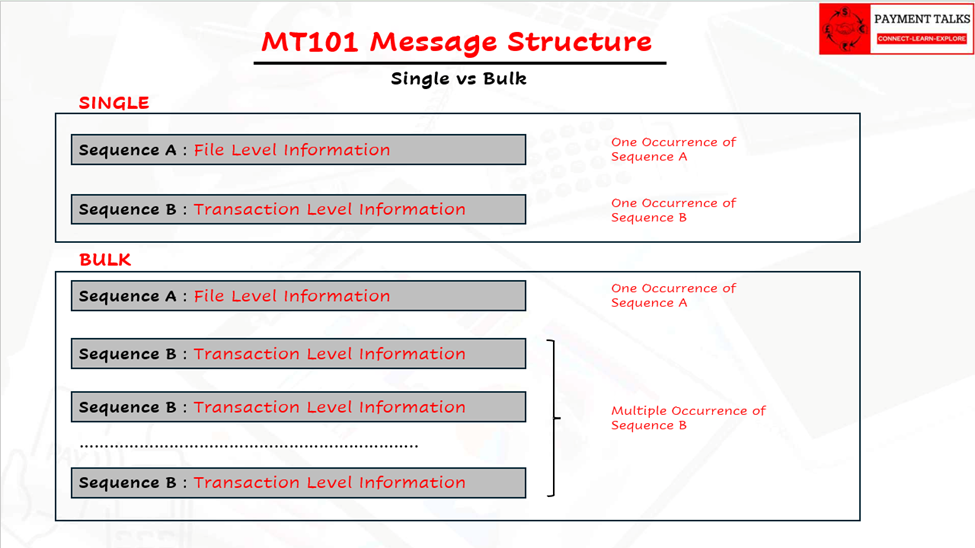
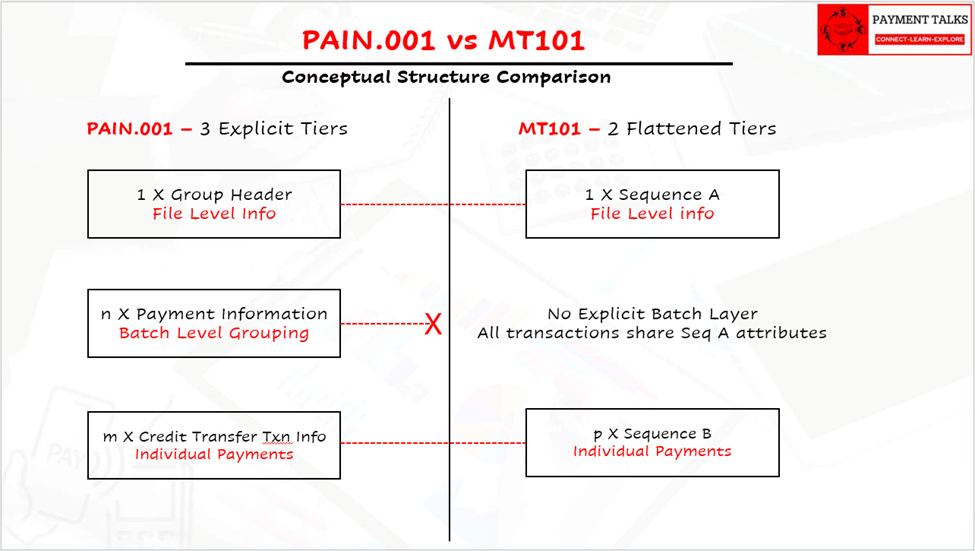
Conceptual Structure Comparison (PAIN.001 vs MT101)
Core Conceptual Differences
1. Hierarchy Depth: 3 levels vs 2 levels
- PAIN.001: File → Batch → Transaction
- MT101: File → Transaction (batch implied)
PAIN.001 explicitly separates:
- File controls (GrpHdr)
- Batch grouping (PmtInf)
- Transaction details (CdtTrfTxInf)
MT101 collapses batch-level info into Sequence A, forcing all transactions to share the same execution date and debtor account.
2. Repetition Pattern
- PAIN.001: 1 GrpHdr (Never Repeats) → n * PmtInf → m * CdtTrfTxInf (in each PmtInf)
- MT101: 1 Sequence A (Never Repeats) → n * Sequence B
3. Batch Flexibility
- MT101 limitation:
Sequence A attributes apply to ALL Sequence B:
- Single execution date
- Single debtor account
- Single service level
- PAIN.001 capability:
Each PmtInf can have:
- Different execution dates
- Different debtor accounts
- Different booking preferences
Structural Difference at a Glance
| Aspect | PAIN.001 | MT101 |
| Format | XML | Text |
| Structure | Hierarchical | Flat |
| Batch concept | Explicit | Implicit |
| Bulk handling | Native | Workaround |
| Validation | Strong (schema-based) | Weaker |
| Machine readability | High | Medium |
| Modern scalability | Excellent | Limited |
Business Scenarios Comparison
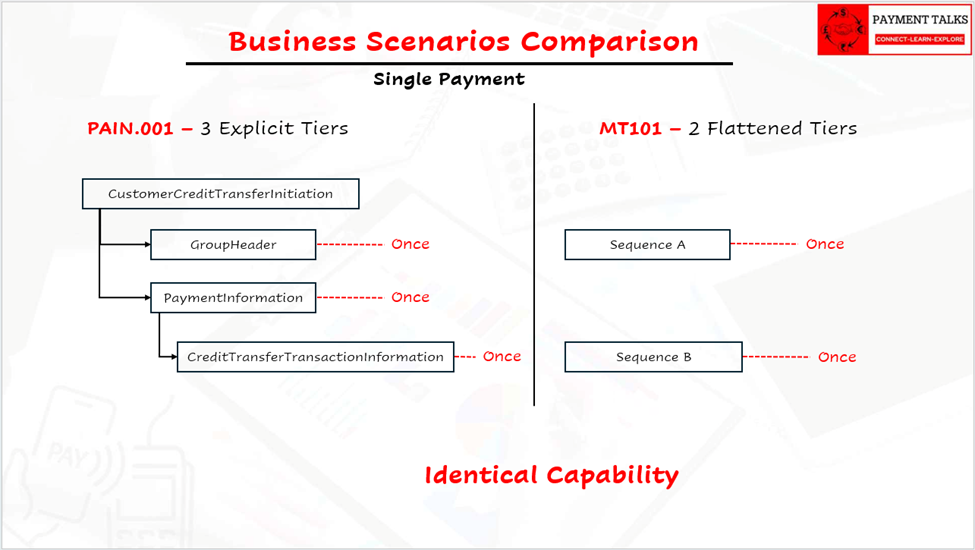
1) Single Payment (Identical capability)
- PAIN.001: 1 GrpHdr + 1 PmtInf + 1 CdtTrfTxInf
- MT101: 1 Seq A + 1 Seq B
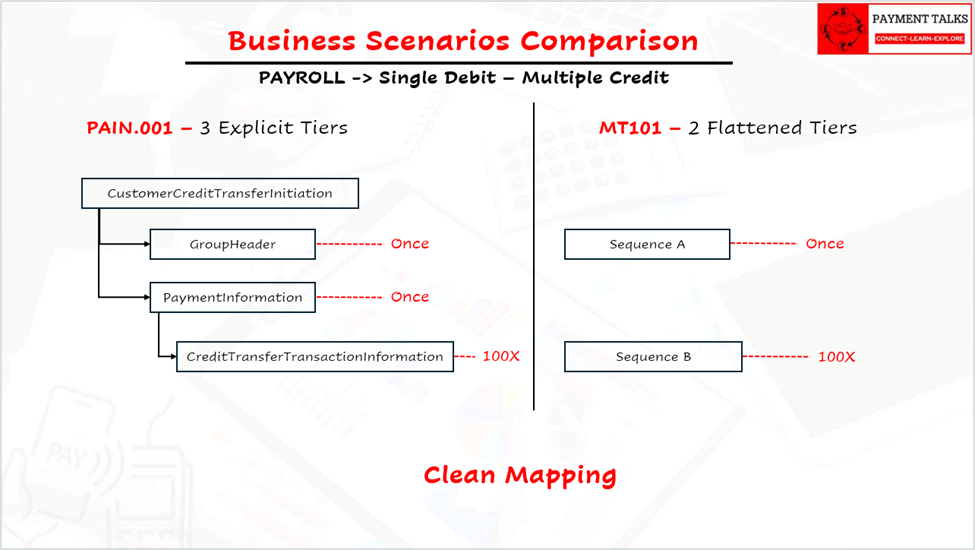
2) Payroll Only (Clean mapping)
- PAIN.001: 1 GrpHdr + 1 PmtInf + 100 CdtTrfTxInf
- MT101: 1 Seq A + 100 Seq B
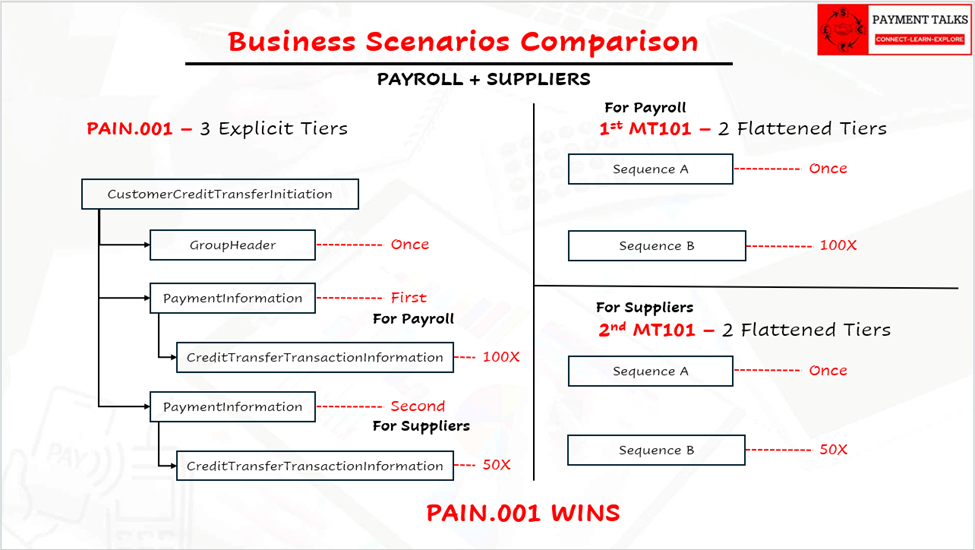
3) Payroll + Suppliers (PAIN.001 wins)
- PAIN.001: ONE FILE
- 1 GrpHdr + 1st PmtInf (Payroll Account, 1st Jan) + 100 salary Beneficiaries (under 1st PmtInf) + 2nd PmtInf (Suppliers Account, 5th Jan) + 50 supplier Beneficiaries (under 2nd PmtInf)
- MT101: TWO SEPARATE MESSAGES
- Msg 1: Seq A (Payroll date/account) + 100 Seq B
- Msg 2: Seq A (Supplier date/account) + 50 Seq B
The “Missing Layer” Problem
MT101 never had an explicit batch layer because:
- All transactions shared Sequence A attributes
- Banks handled operational grouping behind the scenes
- SWIFT FIN treated each MT101 as one atomic message
PAIN.001 explicitly models what MT101 users always wanted.
“I want to send payroll AND suppliers in one file, but keep them operationally separate for tracking/execution”
Key Observation
- Convert MT101 internally → into ISO-like hierarchical structures anyway
Which tells us:
- PAIN.001 reflects how banks actually process payments today.
MT101 reflects how payments were processed decade ago.
Final Takeaway
MT101 is structurally flat and interpretation-based, while PAIN.001 is hierarchical and explicitly modeled.
MT101 says: “Here are instructions — figure them out.”
PAIN.001 says: “Here is the exact structure — process it.”
MT101 thinks: “One header → Many transactions”
PAIN.001 thinks: “One file → Many batches → Many transactions”
That’s the real evolution from MT to ISO 20022.
Why Structure Matters Before Going Field-Level
Understanding structure first is critical because:
Without structure:
- Fields feel random
- Validation feels confusing
- Bulk logic feels magical
With structure:
- Everything has a place
- Everything has a purpose
Fields only make sense inside their layer.