
What Are the Five MT Message Blocks?
Every MT message is built from up to five MT message blocks. Each one is numbered, wrapped in curly braces, and does exactly one job. Miss that structure and you end up debugging the wrong layer when a payment goes sideways.
{1: Basic Header Block}
{2: Application Header Block}
{3: User Header Block}
{4: Text Block}
{5: Trailer Block}
Each block:
- has a fixed role
- follows specific structural rules
- and is processed by different layers of the messaging stack
Think of an MT message like a courier package moving through a logistics network. Block 1 is the depot’s dispatch stamp: who sent it, which session, which sequence number, information the network needs but the recipient never sees. Block 2 is the shipping label: where it’s going, what kind of parcel it is, how urgent. Block 3 is the internal tracking tag the sender’s back office sticks on for its own reconciliation. Block 4 is what’s actually inside the box: the payment instruction itself. Block 5 is the tamper seal that proves nothing was opened or altered in transit.
Keep that picture in mind. It’s the fastest way to know which block to check first when something goes wrong.
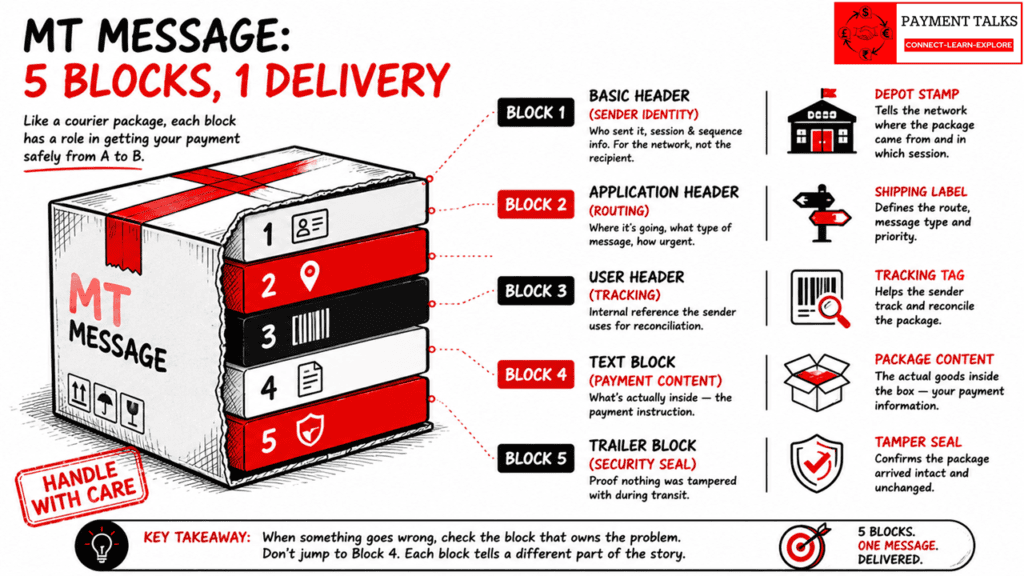
[VISUAL:MT message as a cut-away courier package with 5 stacked layers labeled Block 1 through Block 5 and their function. ]
Block 1: Basic Header Block, Network Identity and Session Control
Purpose
- Identifies the sender’s logical terminal
- Establishes session and sequence context
- Enables network-level tracking and uniqueness
Characteristics
- Mandatory
- Fixed structure
- Generated by the sending system
- No business data
Contains (High-Level)
- Application identifier
- Service identifier
- Sender logical terminal
- Session number
- Sequence number
Field Structure
| Position | Tag/Field | M/O | Description | Data Type/Format | Example |
| a | Block Identifier | Mandatory | Fixed value indicating the Basic Header Block. | 1x (numeric) | 1 |
| b | Application Identifier | Mandatory | Identifies the application (e.g., FIN for user-to-user messages). | 1a (char) | F |
| c | Service Identifier | Mandatory | Specifies the service type (e.g., 01 for FIN user-to-user). | 2n (numeric) | 01 |
| d | LT Identifier (Logical Terminal Address) | Mandatory | Sender’s LT for input messages or receiver’s for output; 12-character BIC + LT code (8+1+3 format). | 12x (alphanumeric) | CITIFRPPAXXX |
| e | Session Number | Mandatory | Identifies the current FIN session (4 digits). | 4n (numeric) | 0070 |
| f | Sequence Number (ISN/OSN) | Mandatory | Unique 6-digit sequence for input (ISN) or output (OSN) session. | 6n (numeric) | 970817 |
Full example: {1:F01CITIFRPPAXXX0070970817}
Block 2: Application Header Block, Message Direction, Type, and Routing
Block 2 defines how the message flows through SWIFT. It exists in two variants: Input (I) when a message is sent to SWIFT, Output (O) when a message is delivered by SWIFT.
Purpose
- Defines message direction
- Identifies message type (MT103, MT202, etc.)
- Specifies sender/receiver context
- Controls message priority
Characteristics
- Mandatory
- Direction-dependent structure
- Partially generated by SWIFT (Output)
- Used heavily in investigations and tracing
Contains (High-Level)
- Direction indicator (I / O)
- Message type
- Logical terminal (receiver or sender reference)
- Priority
- Delivery timestamps (Output only)
- Message Input Reference (Output only)
Input Format Fields (to SWIFT)
| Field | Tag/Name | M/O | Description | Data Type/Format | Example |
| 1 | Input/Output ID | Mandatory | Identifies direction to SWIFT (‘I’ for input). | 1a | I |
| 2 | Message Type | Mandatory | 3-digit SWIFT MT identifier (e.g., 101 for MT101). | 3n | 103 |
| 3 | Destination Address | Mandatory | Receiver’s 12-char LT address (BIC + LT code). | 12x | NDEANOKKBXXX |
| 4 | Priority | Optional | Delivery priority: S (system), N (normal), U (urgent). | 1a | U |
| 5 | Delivery Monitoring | Optional | Monitoring: 1 (warning), 2 (notification), 3 (both). | 1n | 3 |
| 6 | Obsolescence Period | Optional | Delay time in 5-min units before DLM/warning (003=15min U, 020=100min N). | 3n | 003 |
Full input example: {2:I103NDEANOKKBXXXU3003}
Output Format Fields (from SWIFT)
| Field | Tag/Name | M/O | Description | Data Type/Format | Example |
| 1 | Input/Output ID | Mandatory | Identifies direction from SWIFT (‘O’ for output). | 1a | O |
| 2 | Message Type | Mandatory | 3-digit SWIFT MT identifier. | 3n | 103 |
| 3 | Input Time | Mandatory | Sender’s local input time (HHMM). | 4n | 1734 |
| 4 | Message Input Reference (MIR) | Mandatory | 28-char ref: date (6n) + sender LT (12x) + session (4n) + seq (6n). | 28x | 150713NDEANOKKBXXX0073969842 |
| 5 | Output Date | Mandatory | Receiver’s local output date (YYMMDD). | 6n | 160713 |
| 6 | Output Time | Mandatory | Receiver’s local output time (HHMM). | 4n | 1634 |
| 7 | Priority | Optional | Delivery priority: N (normal), U (urgent). | 1a | N |
Full output example: {2:O1031734150713NDEANOKKBXXX00739698421607131634N}
Block 3: User Header Block, Application-Level Metadata and References
Block 3 carries user-defined and SWIFT-defined metadata that supplements the business message.
Purpose
- Carry tracking identifiers
- Support end-to-end reference correlation
- Provide processing instructions or flags
Characteristics
- Optional
- Message-type independent
- Does not contain business payment data
- Elements are called User Header Elements, not fields
Common Elements (Examples)
- Message User Reference (MUR)
- Unique End-to-End Transaction Reference (UETR)
- Processing indicators
Common Fields
| Tag | M/O | Description | Data Type/Format | Example |
| 103 | Optional | Service Identifier for FIN-copy service (e.g., PM processing); absent means direct delivery. Used in MT103, 202, 204. | {103:3!a} | {103:AB1} |
| 108 | Optional | Message User Reference (MUR): sender’s free-format reference up to 16 chars. | {108:16x} | {108:ABC123} |
| 113 | Optional | Banking Priority: 4-char code agreed between users (sender-set, receiver may ignore). | {113:4!x} | {113:URGT} |
| 119 | Optional | Validation Flag: requests STP (103+ rules) or COV (MT202 COV); absent defaults to core rules. Mandatory for MT202 COV. | {119:STP} / {119:COV} | {119:STP} |
| 121 | Optional (mandatory for MT103/202/205 payment variants) | Unique End-to-End Transaction Reference: UUID-like for payment chaining. | {121:36!x} | {121:3fad5ba3-748b-44ba-80a4-ee32507b8e35} |
| 111 | Optional | Service Type Identifier: global payment service code (e.g., 001). | {111:3!n} | {111:001} |
Full Example: {3:{108:0000000000000zza}{111:001}{121:4936052d-7584-436f-aa55-a47914c1cc4c}}
Other fields appear contextually depending on the message and its routing: {106:} (Message Input Ref), {115:} (Addressee Info for Y-copy), {423:} (Balance Checkpoint), {424:} (Related Ref), {165:} (Server Info), and {433:/AOK/} (Sanctions Screening).
Block 4: Text Block, Business Content of the Message
Block 4 is the core of the MT message. This is where the actual payment or financial instruction lives.
Purpose
- Carry business data
- Define who pays whom, how much, when, and how
- Represent the semantic meaning of the message
Characteristics
- Mandatory
- Message-type specific
- Contains MT fields
- Governed by MT Field Format language
Contains
- MT fields identified by tags (e.g., :20:, :32A:, :50K:)
- Field formats using symbols like n, a, c, x, d
- Length rules, optionality, repetitions, and letter options
Structure
Here’s where it gets tricky. The field tag defines what a field means structurally, not what the data inside it looks like. Take the Ordering Customer or Beneficiary fields, tags like :50K: or :59:. Those are name and address fields by definition. But it’s common to see a string in there that looks exactly like a BIC to the naked eye.
A system reading the message correctly still treats that line as free-text name and address, because that’s what the field tag says it is, not as a coded party identifier. Get that distinction wrong in your parsing logic and straight-through processing breaks downstream, even though the message itself is perfectly valid.
Block 5: Trailer Block, Security, Integrity, and Network Controls
Block 5 contains trailer information added by SWIFT to ensure message integrity and security.
Purpose
- Verify message authenticity
- Detect tampering or corruption
- Support network-level validation
Characteristics
- Optional
- Generated and interpreted by SWIFT infrastructure
- Not part of business processing
- Elements are called Trailer Elements, not fields
Common Elements (Examples)
- Message Authentication Code (MAC)
- Checksum (CHK)
- Test and Training indicators
Structure
| Tag | M/O | Description | Data Type/Format | Example |
| MAC | Optional (Mandatory for authenticated messages) | Message Authentication Code. Ensures message authenticity and integrity between SWIFT participants. | Fixed-length alphanumeric (SWIFT-generated) | {MAC:ABCDEF12} |
| CHK | Optional | Checksum. Used to verify message completeness and detect transmission errors. | Fixed-length alphanumeric | {CHK:123456789ABC} |
| TNG | Optional | Test and Training Indicator. Marks the message as test or training traffic. | Fixed literal (no value) | {TNG:} |
| PDE | Optional | Possible Duplicate Emission indicator. Flags a message that may be a duplicate. | Fixed literal | {PDE:} |
| DLM | Optional | Delayed Message Indicator. Indicates delayed delivery of the message. | Fixed literal | {DLM:} |
Full Example: {5:{CHK:123456789ABC}{MAC:ABCDEF12}}
The Troubleshooting Mistake Everyone Makes With MT Message Blocks
Ask any operations team where to look first when a payment stalls or a trace comes back empty, and almost everyone points straight at Block 4. That instinct makes sense. Block 4 is where the actual payment sits: who’s paying whom, how much, and through which accounts.
But Block 4 is rarely the whole story. A session mismatch in Block 1 can stop a message from being accepted before anyone even reads the payment content. A wrong priority or destination address in Block 2 sends the message down the wrong path entirely. A missing UETR in Block 3 breaks end-to-end tracing across correspondent banks, even when the payment data itself is perfect. A failed MAC or checksum in Block 5 flags the whole message as untrusted, regardless of what Block 4 says.
The fix isn’t complicated. When a payment misbehaves, work block by block before you work field by field. Confirm the session and sequence in Block 1. Confirm direction, type, and priority in Block 2. Check whether a UETR or MUR should be present in Block 3 and isn’t. Only then dig into the Block 4 payment content.
How MT Message Blocks Work Together (Architectural View)
| Layer | MT Block | Role |
| Network Layer | Block 1 | Sender identity and session |
| Routing Layer | Block 2 | Direction, message type, priority |
| Application Metadata | Block 3 | References and tracking |
| Business Layer | Block 4 | Payment data |
| Security Layer | Block 5 | Integrity and authentication |
This layered design is deliberate. It directly influenced the architecture of modern messaging standards.
Think back to the courier package. Depot stamp, shipping label, internal tag, box contents, tamper seal. Five layers, five jobs, zero overlap.
MT Message Blocks and Their Relationship to ISO 20022
ISO 20022 formalizes the same separation of concerns MT message blocks already use.
| MT Concept | ISO 20022 Equivalent |
| Blocks 1 & 2 | Application Header (AppHdr) |
| Block 3 | Application / Business references |
| Block 4 | Business Message (pacs, pain, camt) |
| Block 5 | Network / envelope controls |
Understanding MT blocks makes ISO 20022 easier to learn, easier to map against, and easier to troubleshoot once you’re live.
Key Takeaways
- MT messages are block-structured by design, with up to five MT message blocks doing five distinct jobs
- Each block has a clear, non-overlapping role
- Only Block 4 carries business fields; Blocks 1, 2, 3, and 5 handle network, routing, tracking, and control
- Most troubleshooting time gets spent in Block 4 when the actual fault often sits in Block 1, 2, 3, or 5
- This separation is the foundation ISO 20022 formalized into AppHdr, business message, and envelope controls
Frequently Asked Questions About MT Message Blocks
Q: What are the five blocks in an MT message?
A: Every MT message can carry up to five MT message blocks: Block 1 (Basic Header) for sender identity and session control, Block 2 (Application Header) for direction and message type, Block 3 (User Header) for optional metadata and tracking references, Block 4 (Text Block) for the actual payment instruction, and Block 5 (Trailer) for security and integrity checks.
Q: Which MT message blocks are mandatory?
A: Block 1, Block 2, and Block 4 are mandatory on every MT message. Block 3 and Block 5 are optional, though Block 3 becomes mandatory in specific cases, like when a UETR is required on MT103, MT202, or MT205 payment variants.
Q: What’s the difference between Input and Output format in Block 2?
A: Input format is used when a message is sent to SWIFT and carries the destination address and priority. Output format is used when SWIFT delivers the message and adds fields SWIFT itself generates, like the Message Input Reference and delivery timestamps. Same block, two different shapes depending on direction.
Q: Why does everyone check Block 4 first when a payment goes wrong, and why is that a mistake?
A: Block 4 holds the business data, the actual payment instruction, so it feels like the obvious place to look first. But plenty of failures start upstream: a session or sequence problem in Block 1, a routing or priority misconfiguration in Block 2, a missing UETR in Block 3, or an integrity failure in Block 5. Checking block by block, not just field by field inside Block 4, gets you to the real cause faster.
Q: Can data inside a Block 4 field look like a BIC but not actually be one?
A: Yes, and it trips people up constantly. Fields like the Ordering Customer or Beneficiary lines are name and address fields by tag definition, even if the sender happens to put something that looks exactly like a BIC inside the free text. The field tag decides how the data is structured and processed, not what the string looks like to a human reading it.
Q: How do MT message blocks map to ISO 20022?
A: Blocks 1 and 2 correspond to the ISO 20022 Application Header (AppHdr). Block 3 maps to application and business references. Block 4, the business content, maps to the ISO 20022 business message itself (pacs, pain, or camt). Block 5 maps to network and envelope controls. The separation of concerns is the same idea in both standards.
Q: Is Block 3 always present in an MT message?
A: No. Block 3 is optional by default. It only becomes mandatory in specific cases, most notably when a Unique End to End Transaction Reference (UETR) is required for payment chaining on MT103, MT202, or MT205 variants.