
MT field formats are the strict, symbolic rules that tell a SWIFT parser exactly how to read, validate, and reject every line inside an MT message. Call MT “legacy” all you want. It still clears a large share of global payment volume, and if you’ve ever watched a test case fail because someone typed a decimal point instead of a comma, you already know these rules aren’t optional trivia.
Understanding MT field formats isn’t about memorising symbols for their own sake. It’s about understanding three things: how payment data was historically constrained by character-level parsing, why ISO 20022 was built the way it was in direct response, and why production and test teams still hit the same handful of format traps in 2026.
This article gives you a complete, structured walkthrough of MT field formats, covering:
- message and block structure
- tags and delimiters
- format notation
- length rules
- optionality
- separators
- character sets
- letter options
- validation philosophy
- and why MT knowledge still matters after ISO 20022 migration
What Is an MT Message?
An MT (Message Type) message is a structured, text-based financial message defined by SWIFT. Each MT message serves one specific business purpose, a customer credit transfer, an interbank transfer, a statement, follows a predefined structure, and must comply with strict formatting rules before a receiving system will even attempt to interpret it.
Unlike XML-based standards, MT relies on positional parsing and character-level validation. There’s no schema sitting behind it at runtime. Just a rulebook every field must follow.
What Is the High-Level Structure of an MT Message?
An MT message is divided into logical blocks, each enclosed in curly braces { }:
- {1: Basic Header Block}
- {2: Application Header Block}
- {3: User Header Block}
- {4: Text Block}
- {5: Trailer Block}
Key points:
- Curly braces {} are block delimiters
- Blocks are identified by block numbers
- Field formats apply primarily to Block 4, the Text Block
The end of Block 4 is explicitly marked by “-}”. A missing or misplaced block delimiter invalidates the entire message. The parser won’t get far enough to even look at your field formats.
For the full breakdown of what each block carries, see Overview of MT Message Blocks.
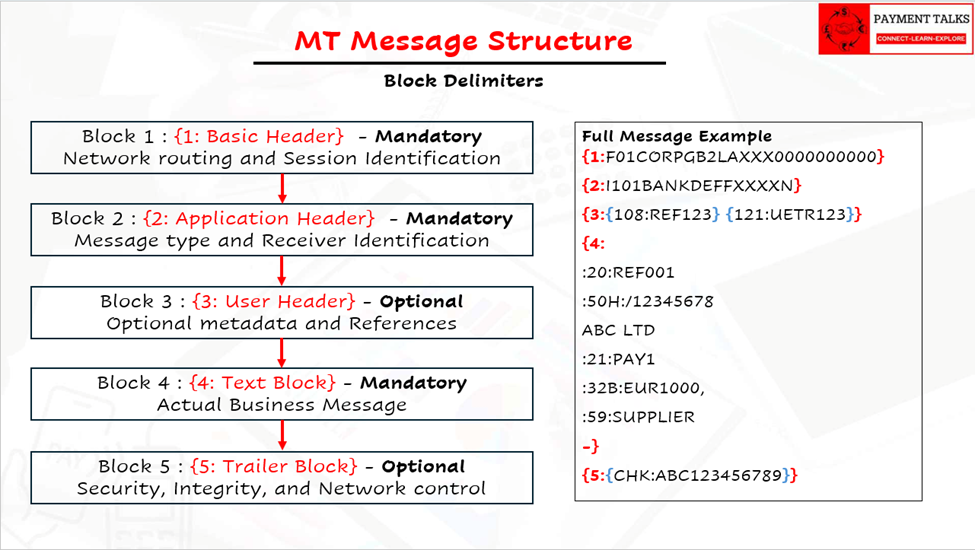
[VISUAL 1: SWIFT MT message structure diagram showing Block 1 to Block 5]
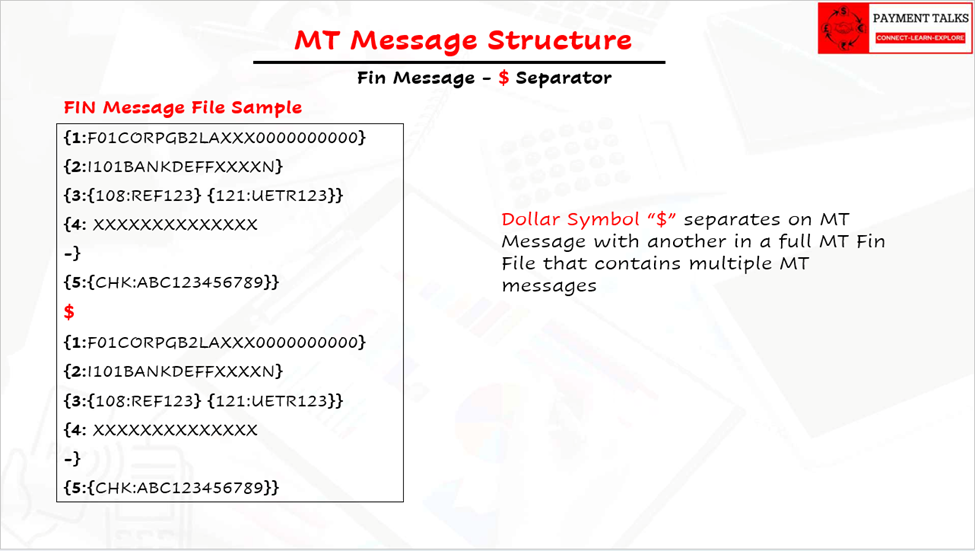
[VISUAL 2: MT message block breakdown with Basic Header, Application Header, and Text Block]
What Are Tags and Delimiters in an MT Message?
What Is a Tag?
A tag in Block 4 is a field identifier that tells the parser what business information follows and how it must be interpreted.
MT messages are not self-describing like XML. There are no element names or schemas at runtime.
Tags solve this by:
- Identifying business meaning
- Enforcing field format rules
- Allowing deterministic parsing
- Enabling message-type-specific validation
Without tags, MT messages would be ambiguous free text.
How Is a Tag Structured?
Format: “:Tag:”
Block 4 tags consist of:
- 2 or 3 digits, sometimes
- followed by a letter option
Examples:
- :20:
- :32A:
- :50K:
- :59F:
Numeric part: identifies the business field. Same number always means the same business role.
Letter option: tells you the specific data representation and format rules that apply.
What Are the Tag Delimiter Rules?
| Element | Purpose |
| : (colon) | Marks start and end of the tag |
| Line break | Marks end of field content of tag information |
| -} | Marks end of Block 4 |
Rules:
- Tags always start on a new line
- Only one tag per line start
- Tags are case-sensitive and uppercase
- Fields must appear in the prescribed sequence
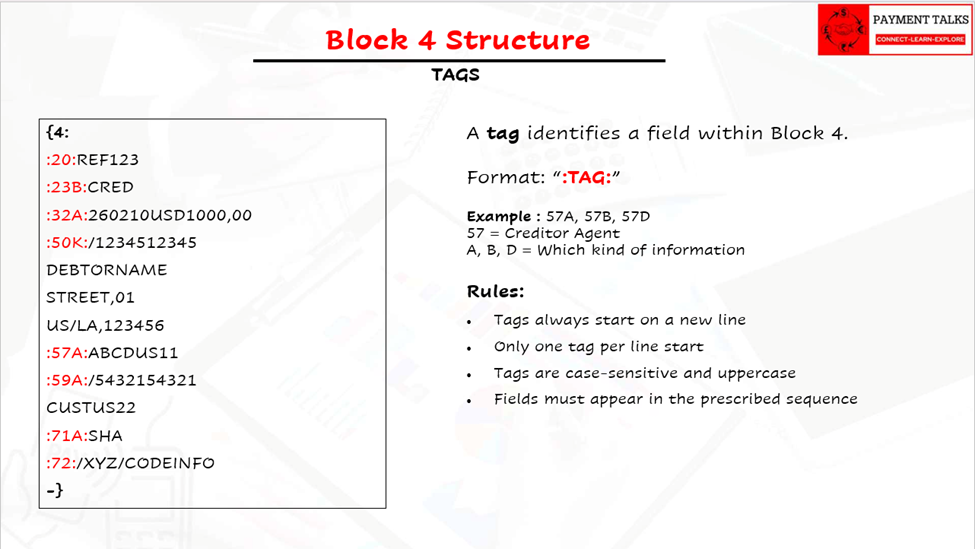
[VISUAL 3: Example of MT tag structure with colon delimiters in Block 4]
How SWIFT Describes MT Field Formats
SWIFT defines field formats using symbolic notation, not examples. This notation, published and maintained by SWIFT as part of the FIN message standards, precisely defines allowed character types, length constraints, and repetition rules.
What Are the Core MT Format Symbols?
| Symbol | Meaning |
| n | numeric digits (0 to 9) only |
| a | alphabetic letters (A through Z), upper case only |
| c | alphabetic letters (upper case) and digits only |
| h | hexadecimal letters A through F (upper case) and digits only |
| x | any character of the X permitted set, upper and lower case allowed |
| y | any character of the EDIFACT level A character set as defined in ISO 9735 |
| z | any character as defined by the Information Service |
| e | blank space |
| d | decimal number (comma as decimal separator) |
The y symbol references ISO 9735, the EDIFACT standard maintained by the International Organization for Standardization (ISO), which is why you’ll occasionally see it called out separately from SWIFT’s own X character set.
How Do Character Sets and Case Sensitivity Work in MT Fields?
MT messages do not have a single global uppercase rule. Character case depends on the format symbol used.
The a, c, h Symbols: Uppercase Only
Uppercase only. Lowercase is not allowed.
Used for:
- Currency codes
- Qualifiers
- Identifiers
x — The SWIFT Character Set
Includes lowercase letters. Includes uppercase letters, digits, and allowed punctuation.
Most name and address fields use x, for example:
4*35x
Therefore:
- John Doe → valid
- JOHN DOE → valid
- John doe, Riyadh → valid
Uppercase-only behaviour often seen in practice is an implementation choice, not a SWIFT rule.
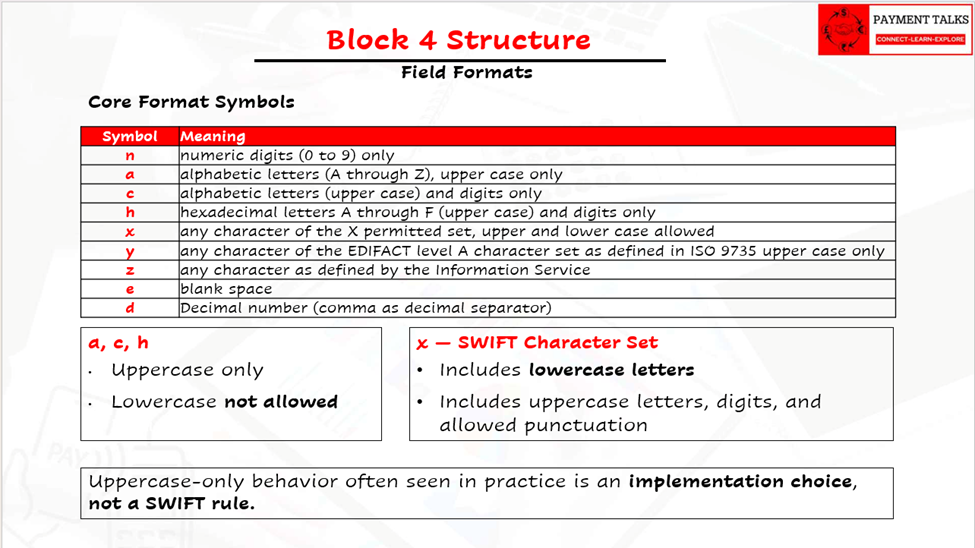
[VISUAL 4: x character set example showing mixed-case name and address field in MT format]
What Are the Decimal and Numeric Rules in MT Fields?
MT numeric fields split into two symbols: n for pure digits, and d for decimal amounts. The distinction matters because they’re validated differently, and one of them has a rule that trips up almost every new tester.
Decimal amounts in MT use a comma as the decimal separator, not a period. A field defined as 15d expects something like 1234,56, not 1234.56. That’s a SWIFT convention, not a typo, and it holds regardless of which country’s amount format the underlying business data came from.
🚩 This is the single most common test-data defect I see. Testers build sample amounts in a spreadsheet or a web tool that defaults to period decimals, copy them straight into an MT test message, and the parser rejects or silently mis-maps the field. The amount looks correct to a human eye. It’s wrong to the parser. If you’re setting up test data generation for MT messages, validate the decimal separator before you validate anything else in the amount field.
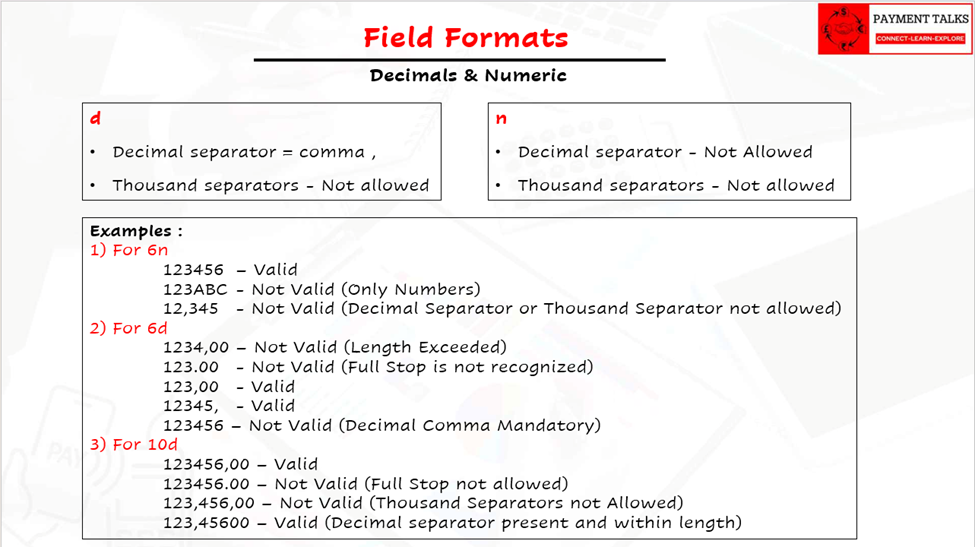
[VISUAL 5: Decimal and numeric rules example in MT field formats using comma separator]
What Does the Exclamation Mark (!) Mean in MT Field Formats?
The exclamation mark is a length qualifier, and it changes the meaning of the format symbol next to it.
Without “!”, a format like 35x means up to 35 characters. Fewer is fine.
With “!”, a format like 3!a means exactly 3 characters. Not fewer, not more. 3!a is how currency codes are defined in MT, because a currency code is always three uppercase letters, never two, never four.
Miss that distinction during test design and you’ll build test cases that pass when they shouldn’t, because a field validated as “up to 3” will happily accept 2 characters that a real “exactly 3” rule would reject.
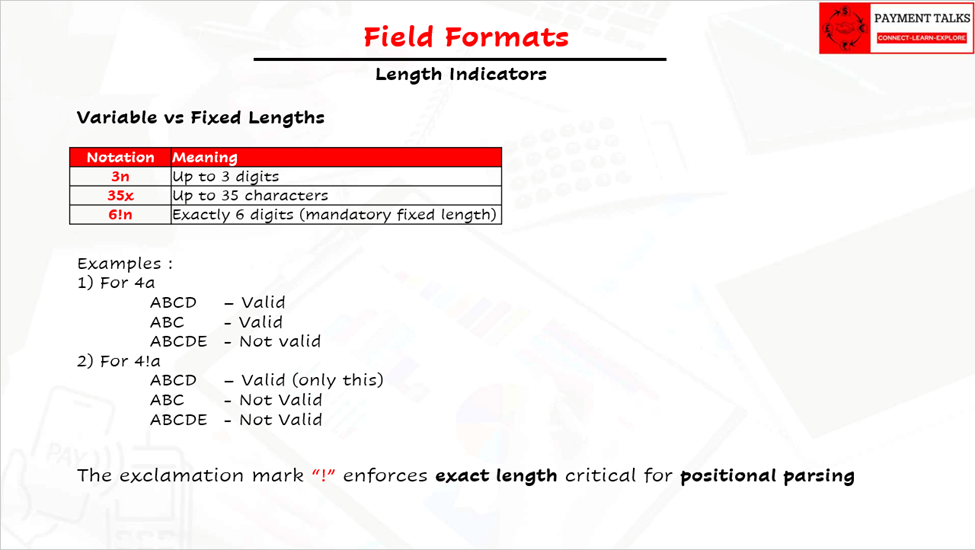
[VISUAL 6: Exclamation mark length indicator example in MT field formats]
What Does the Asterisk (*) Mean in MT Field Formats?
The asterisk notation governs repeating lines, and it appears constantly in name, address, and narrative fields.
A format like 4*35x means: up to 4 lines, each holding up to 35 characters from the SWIFT x character set. It’s two constraints stacked together, a line-count limit and a per-line character limit, and both have to hold independently.
This is where address fields get tested wrong. A tester checks total character count and assumes the field passes. But an MT parser checks per-line length and line count, not the sum. Five short lines can fail where four long lines pass, depending purely on how the data gets broken up.
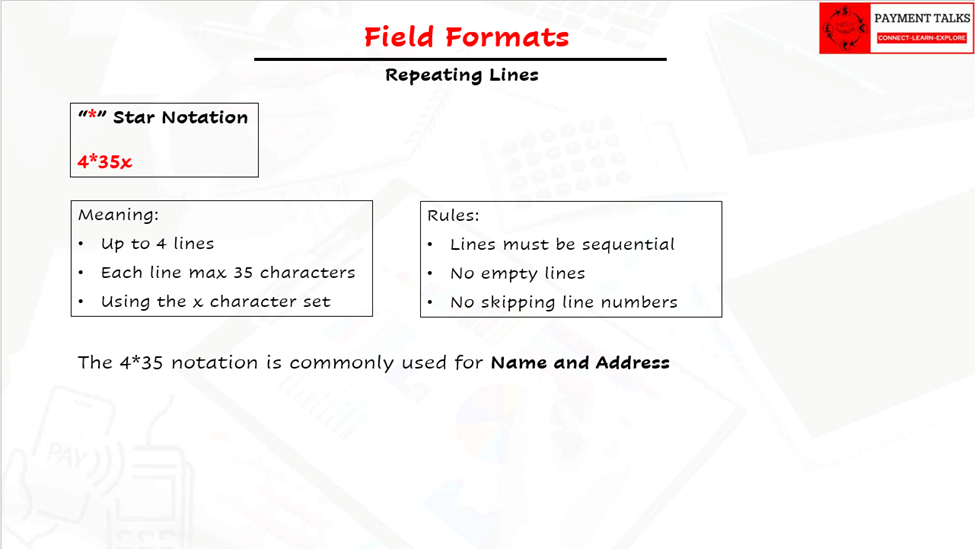
[VISUAL 7: Repeating lines asterisk notation example in an MT field]
What Is a Composite Field Format in MT Messages?
Some MT tags aren’t a single format string. They’re several sub-fields stacked under one tag, each with its own format rule.
Field :50K: (Ordering Customer) is a good example: it can carry an account line and separate name-and-address lines underneath the same tag, and each of those lines follows its own notation rather than one format applying to the whole block.
Composite fields are where reading the format specification line by line matters most. Treat the whole tag content as one blob to validate, and you’ll miss that the account line and the address lines have completely different rules.
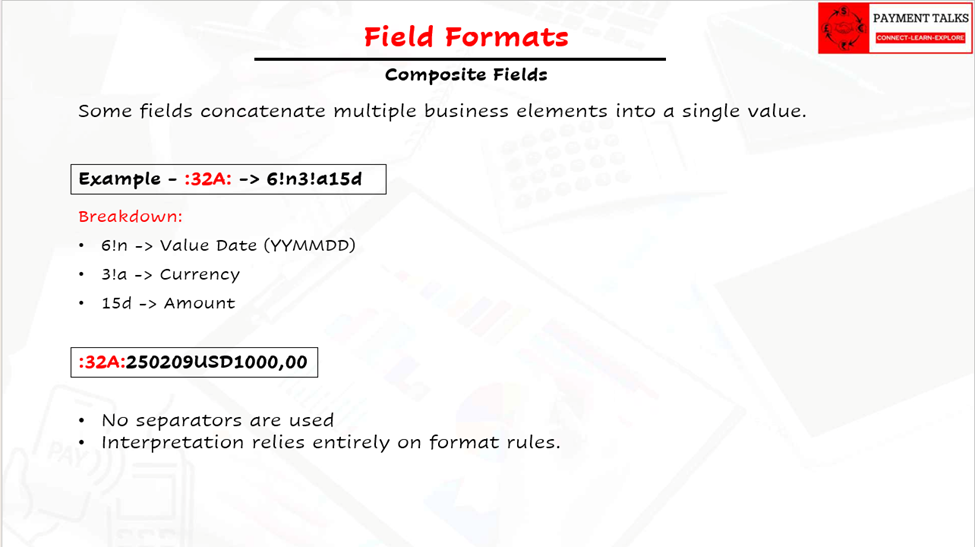
[VISUAL 8: Composite MT field format example with multiple sub-fields]
What Do Square Brackets [ ] Mean in MT Field Formats?
Square brackets mark optional content. Anything sitting inside [ ] doesn’t have to be present. Anything outside the brackets is mandatory, full stop.
A field like [/34x] is a good example of where this gets genuinely confusing in testing, and not because the rule itself is hard. The forward slash is part of what’s optional, not a separate structural marker sitting outside it. So the question isn’t just “is this line present or absent”, it’s “if it’s present, does it include the slash exactly as specified.”
🚩 From what I’ve seen in test cycles, this is where testers lose the thread. Someone keeps the slash, someone else drops it, and because both versions parse without an obvious error, nobody’s sure anymore what the test case is actually meant to prove. The fix isn’t complicated. Treat the bracketed content, slash included, as one atomic unit you either send whole or omit entirely.
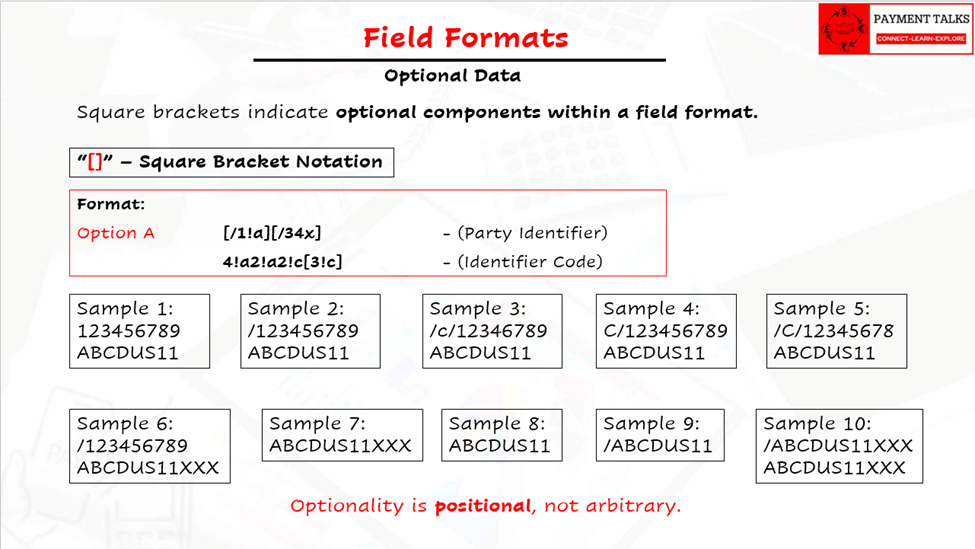
[VISUAL 9: Optional data in square brackets example in MT field formats]
What Are Separators Inside MT Fields?
Separators are characters used inside a field’s content to mark structure, and they’re a different thing entirely from the colon that delimits a tag.
A single slash “/” commonly separates a qualifier or account number from the data that follows it. A double slash “//” often marks a continuation or a specific sub-element depending on the field. Neither is decorative. Both change how the parser splits the content into meaningful parts.
This connects directly to the optional-bracket trap above: whenever a separator sits inside an optional block, you have to decide, deliberately, whether it travels with the data or gets treated as structure. Get that decision wrong once in a test script, and every tester who reuses that script inherits the same ambiguity.
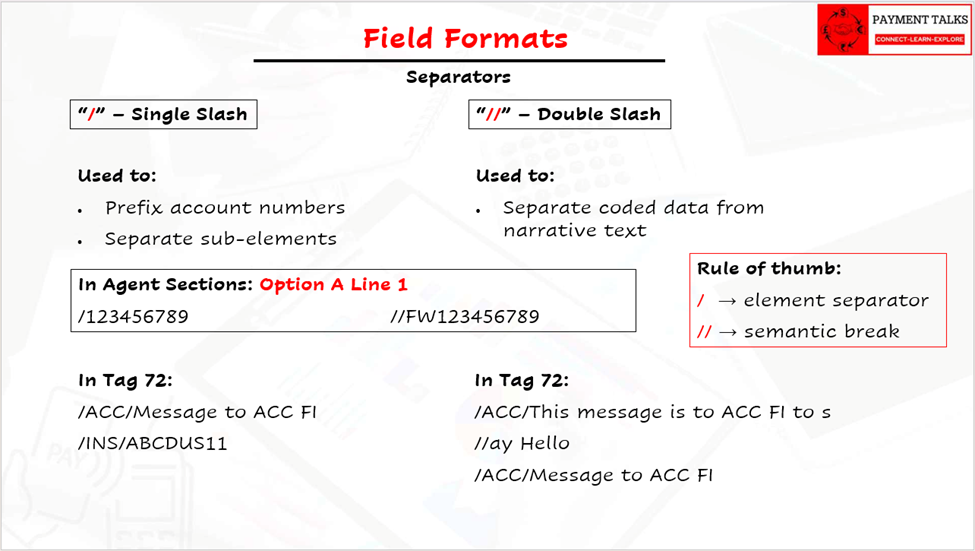
[VISUAL 10: Slash separator example inside an MT field]
What Are Letter Options in MT Fields?
You’ve already seen letter options in this article without naming them: :32A:, :50K:, and :59F: all carry a letter after the number. :20: doesn’t.
The number identifies the business field. Same number, same business role, wherever it shows up. The letter option identifies which structural variant of that field applies, a different format, a different set of sub-lines, sometimes attached to the same business role.
🚩 This is where testing coverage quietly breaks down. A tester picks the right tag number and either the wrong letter option or no letter option at all, and because the message can still parse structurally, the error doesn’t surface immediately. It shows up later, in reconciliation or downstream mapping, by which point nobody connects it back to a test case that “passed.” If letter options aren’t a separate dimension in your test matrix, distinct from the tag number, you’re not actually testing the field.
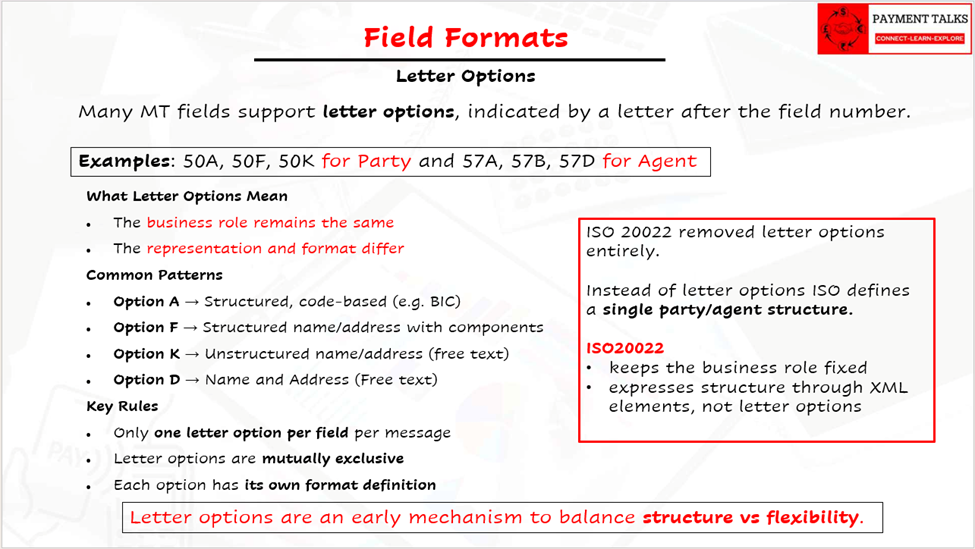
[VISUAL 11: Letter option examples for MT tags such as 32A and 50K]
Mandatory, Optional, and Repeating Fields: What’s the Difference?
At message level:
- Some fields are mandatory
- Some are optional
- Some are repeatable
A field may be perfectly formatted and still invalid if:
- It appears when not allowed
- It appears too many times
- It appears out of sequence
Why Is MT Format Validation So Strict?
MT field formats are built for deterministic parsing, minimal ambiguity, and high resilience in systems that have been running for decades. There’s no schema to fall back on and no forgiving interpreter. Even a single character violation can break parsing, cause outright rejection, or, worse, get accepted and misinterpreted downstream.
That’s exactly why the traps covered above, comma decimals, exact-length fields, optional slashes, letter options, aren’t edge cases. They’re the actual surface area of MT testing. Every one of them looks like a small formatting detail until it causes a rejected message or a silent mis mapping that only turns up in reconciliation.
Why MT Field Format Knowledge Still Matters in 2026
ISO 20022 is the strategic standard SWIFT has endorsed, but the operational reality on the ground is hybrid, not fully migrated.
MT still matters because:
- Plenty of banks run MT-based payment engines with ISO converters sitting in front of them, translating inbound ISO traffic back into MT internally rather than replacing the engine outright
- MT940 and other MT-based statement and reporting messages are still in daily use, entirely separate from the payment-value migration
- Several domestic clearings have built their own proprietary MT-based message formats with no ISO 20022 equivalent, and they aren’t going anywhere soon
- Translators map MT to ISO and back every day, and investigations still get repaired at the MT field level
You can’t design correct MT-to-ISO mappings, validate translation logic, understand truncation behaviour, or debug a production issue without understanding MT field formats. Not until every bank, on every corridor, on every clearing, has fully moved off MT. That’s not close to happening yet.
How MT Knowledge Helps Learn ISO 20022
MT formats explain why ISO 20022 is structured the way it is: why party roles are explicit, why truncation rules exist, why enrichment is required before certain fields can populate.
Think of it this way:
- MT defines the problem
- ISO 20022 defines the solution
If you’re building toward ISO 20022 fluency, start with Fundamentals of ISO 20022 and Building Blocks of ISO 20022 to see how directly ISO’s structure answers the constraints MT worked under for decades.
Understanding MT first makes ISO 20022 intuitive instead of overwhelming.
Final Takeaway
MT field formats are not obsolete trivia. They’re the foundation modern payment messaging evolved from, and testers, developers, and architects still run into them every working week.
Understanding them gives you deeper system insight, stronger debugging skills, sharper ISO 20022 comprehension, and, frankly, credibility in the room when a production issue traces back to a malformed field.
MT may no longer be the future. It’s still the grammar of today’s payment reality.
If you want the field-by-field walkthrough next, MT101 Message Fields Explained — With PAIN.001 Mapping picks up exactly where this leaves off.
Frequently Asked Questions About MT Field Formats
Q1: What does the exclamation mark (!) mean in SWIFT MT field formats?
A1: It marks a fixed length. 3!a means exactly 3 alphabetic characters, not up to 3. Drop the “!” and the same symbol means “up to.”
Q2: Why does SWIFT use a comma instead of a period for decimals in MT fields?
A2: The d format symbol defines a comma as the decimal separator by convention. Test data built with period decimals will fail parsing even though the amount looks correct to a human reader.
Q3: What is the difference between MT field formats and ISO 20022 field formats?
A3: MT formats rely on positional, symbolic notation (n, a, x, d) with no schema at runtime. ISO 20022 fields are self-describing XML elements validated against a published schema. MT defines the constraint problem, ISO 20022 solves it structurally.
Q4: What does the asterisk (*) mean in an MT field format?
A4: It denotes repeating lines. 4*35x means up to 4 lines, each holding up to 35 characters of the SWIFT x character set, common in name, address, and narrative fields.
Q5: Are MT messages still used in 2026?
A5: Yes. Many banks still run MT-based payment engines with ISO converters in front, MT940-style statement messages remain in daily use, and several domestic clearings run proprietary MT-based formats with no ISO equivalent.
Q6: What is a letter option in an MT tag, like the “A” in :32A:?
A6: The number identifies the business field. The letter option identifies which structural variant of that field applies. Using the wrong letter option, or omitting it, is a common testing error that doesn’t surface until reconciliation.
Q7: What do square brackets mean in MT field format notation?
A7: Anything inside [ ] is optional. Anything outside the brackets is mandatory. A common testing mistake is inconsistently keeping or dropping an optional leading slash, which blurs whether the slash is structural or literal data.
Q8: Where in an MT message do field formats actually apply?
A8: Almost entirely to Block 4, the Text Block. Blocks 1, 2, 3, and 5 carry header and trailer data with their own fixed structures, not the field-level notation covered here.
▶ Watch the Full Walkthrough on YouTube
Prefer video? The full walkthrough is on the PaymentTalks YouTube channel.